Key Takeaway
Production agentic AI workflows require five architecture patterns: right execution model (sequential vs parallel), tiered state management, explicit failure recovery paths, human-in-the-loop checkpoints for high-stakes actions, and structured observability from day one.
Most engineering teams that start building agentic AI workflows have the same experience: the first version works. The demo runs cleanly. The LLM calls execute, the tools respond, the output looks right. Then you put it in front of real users with real data and the wheels start to come off.
The agent gets confused mid-workflow. State from one run bleeds into the next. A tool returns an unexpected response format and the whole chain fails silently. You can’t tell from the logs why it made the decision it made.
The LLM calls are not where the hard problems live. Those are mostly solved: pick a capable model, write a good system prompt, define your tools. The hard part is everything that wraps the LLM calls. State management. Failure recovery. Observability. Orchestration logic. These are where the gap between a demo and a production system opens up.
This post covers five architecture patterns that address that gap. They’re framework-agnostic. Whether you’re building on LangGraph, AutoGen, a custom orchestration layer, or raw API calls, these patterns apply.
Why Is Agentic Workflow Architecture Harder Than It Looks?
A single LLM call is simple to reason about. Input goes in, output comes out. If the output is wrong, you adjust the prompt.
A multi-step agent workflow is not simple to reason about. Each step’s output becomes the next step’s input. Errors accumulate. An incorrect extraction at step 2 shapes every decision the agent makes at steps 3 through 8. By the time you see a wrong result at the end, the causal chain runs back several steps and may involve non-deterministic model behavior that doesn’t reproduce consistently.
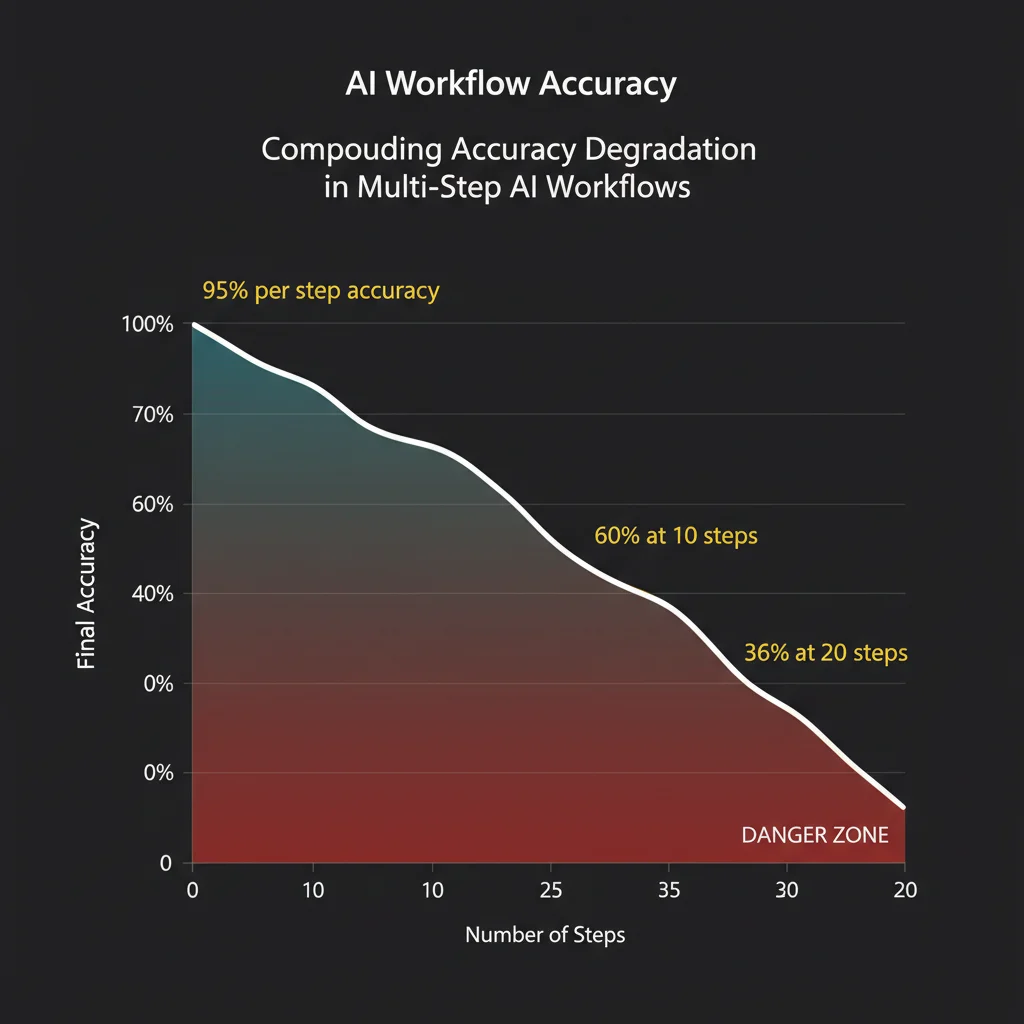
There’s a compounding math problem here. An agent that executes a 10-step workflow at 95% accuracy per step delivers the correct final result roughly 60% of the time. At 20 steps, that drops to 36%. The implication is that per-step reliability requirements in agent workflows are much stricter than they seem. You can’t just aim for “mostly right” at each step and expect the system to be usable.
Compounding errors are not the only problem. Production agentic workflows also have to handle:
State continuity across asynchronous operations. If your agent fans out to process 50 documents in parallel and three of them fail halfway, where does the workflow resume? What happens to the work that completed successfully?
Unrecoverable actions. Agents that write to databases, send emails, or call external APIs take actions with real consequences. The agent’s reasoning process is non-deterministic, but the actions it triggers are not reversible.
Evaluation without deterministic outputs. Traditional software tests verify exact outputs. Agent workflows are non-deterministic. The same input can produce different outputs across runs. Your test suite needs to verify behaviors, not strings.
Observability gaps. When an agent makes a wrong decision, you need to understand why. Standard application logs don’t capture the agent’s reasoning chain, which tool calls it made, what data it passed, and what logic led to the action it took.
These are the problems the following patterns are designed to address.
Pattern 1: Sequential vs. Parallel Execution
The first architecture decision in any agentic workflow is whether steps run sequentially or in parallel. Most teams default to sequential because it’s simpler to reason about. That default is often wrong.
Sequential execution is correct when each step depends on the output of the previous step. A customer support workflow that classifies a ticket, then looks up account context based on the classification, then drafts a response based on the account context runs sequentially because the ordering is a dependency. You can’t draft the response before you know the account context.
Parallel execution is correct when steps are independent. An agent that processes 50 financial documents to produce a summary report doesn’t need to wait for document 1 to finish before starting document 2. Fan out, process all 50 simultaneously, then aggregate. The latency difference is significant: at 3 seconds per document, sequential processing takes 150 seconds. Parallel processing takes 3 seconds plus aggregation overhead.
The practical implementation requires a few things sequential workflows don’t:
A scatter-gather coordinator that spawns parallel workers, tracks their completion state, and waits for all to finish (or handles partial completion gracefully) before proceeding. This is distinct from an LLM orchestrator — it’s usually deterministic scheduling logic around the LLM calls.
Worker isolation. Parallel workers need their own context. If you’re using a shared context window, workers will contaminate each other’s reasoning. Each parallel branch should receive exactly the context it needs for its specific task, nothing more.
Aggregation logic. After fan-out, you need to merge results. For extraction tasks, this might be straightforward — combine extracted fields from 50 documents into a single schema. For analytical tasks, the aggregation step may itself require an LLM call to synthesize parallel findings into a coherent whole.
The common mistake: treating a parallelizable workflow as sequential because it’s easier to build. If your workflow processes a batch of independent inputs, fan out. The latency and cost improvement is often an order of magnitude.
Pattern 2: State Management Without Bloating the Context Window
State management is where most agent workflows break first.
The naive approach: put everything in the context window. Every tool call result, every intermediate output, every decision the agent has made so far. This works for short workflows. It fails for long ones. Context windows are large — GPT-4 Turbo’s 128K tokens and Claude’s 200K tokens sound generous — but they fill faster than you’d expect when you’re accumulating tool outputs, conversation history, and intermediate results across a dozen steps.
More importantly, a bloated context degrades performance. LLMs attending over a long context don’t weight information uniformly. Earlier content gets less attention. The agent effectively forgets things that are technically still in context. Developers report this as “context drift” — the agent stops referencing information it clearly has access to.
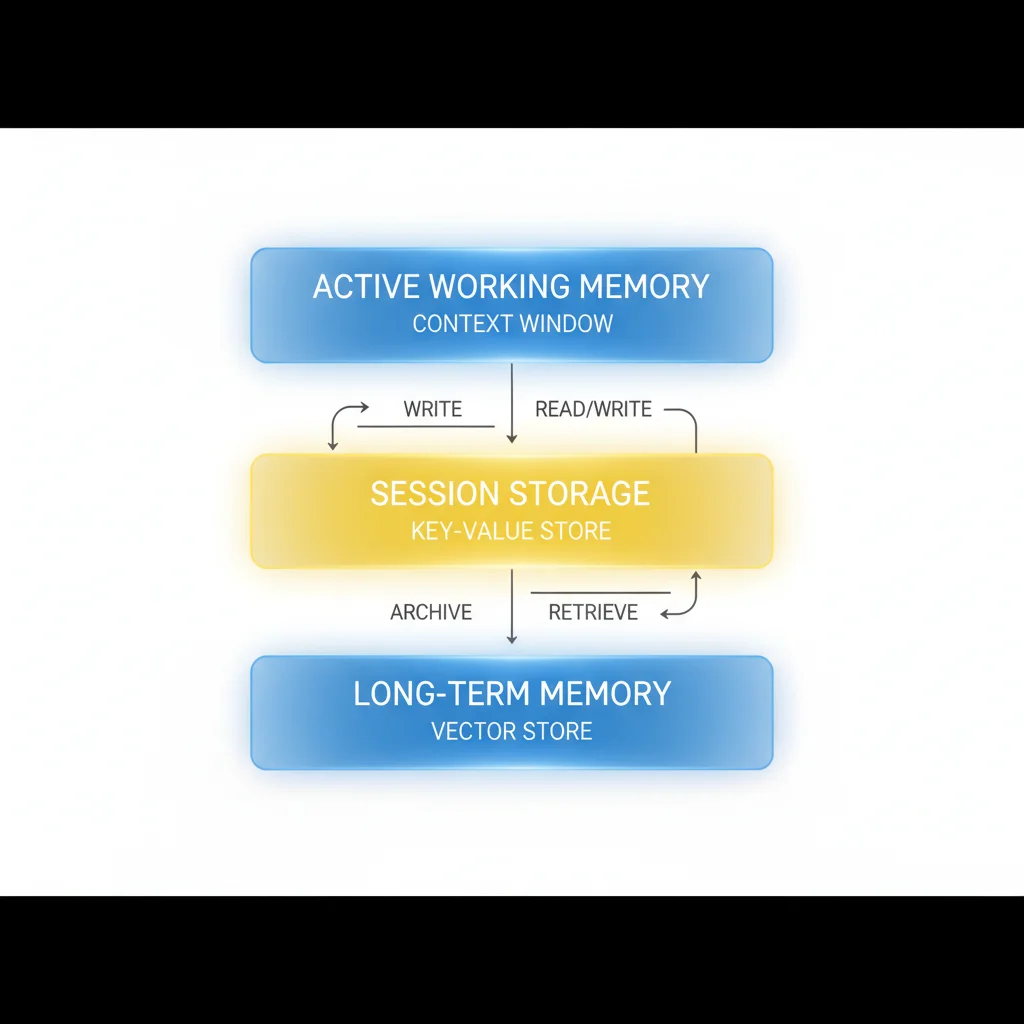
Production state management uses a tiered model:
Active working memory lives in the context window. This is the information the agent needs right now: the current task, the immediately preceding step’s output, and the structured schema it’s filling in. Keep this tight. When a tool returns a 10,000 token result and the agent only needs three fields from it, extract those fields and discard the rest before passing to the next step.
Short-term session storage lives outside the context window, in a key-value store or structured database. This is the accumulated state for the current workflow run: what steps have completed, what data has been extracted, what decisions have been made. The agent retrieves specific fields from session storage as needed rather than loading everything into context.
Long-term memory lives in a vector store or structured knowledge base. This is cross-session context: user preferences, historical patterns, learned domain knowledge. Retrieved at inference time via semantic search, with relevance filtering to keep the retrieved context manageable.
The architecture for pulling state into context matters. Rather than loading all stored state, design explicit “context assembly” steps that fetch exactly what the next step needs. Before a drafting step, retrieve only the relevant extracted fields. Before a decision step, retrieve the accumulated constraints plus the current task. Treat context assembly as a first-class operation in your workflow design.
One pattern that works well: structured state objects with explicit fields rather than free-form context accumulation. Instead of appending tool outputs to a conversation history, write results to typed fields in a state object. The agent reads from and writes to this object at each step. The state object becomes the ground truth for the workflow. What’s in context at any given step is the subset of state relevant to that step’s task.
Pattern 3: Failure Modes and Recovery
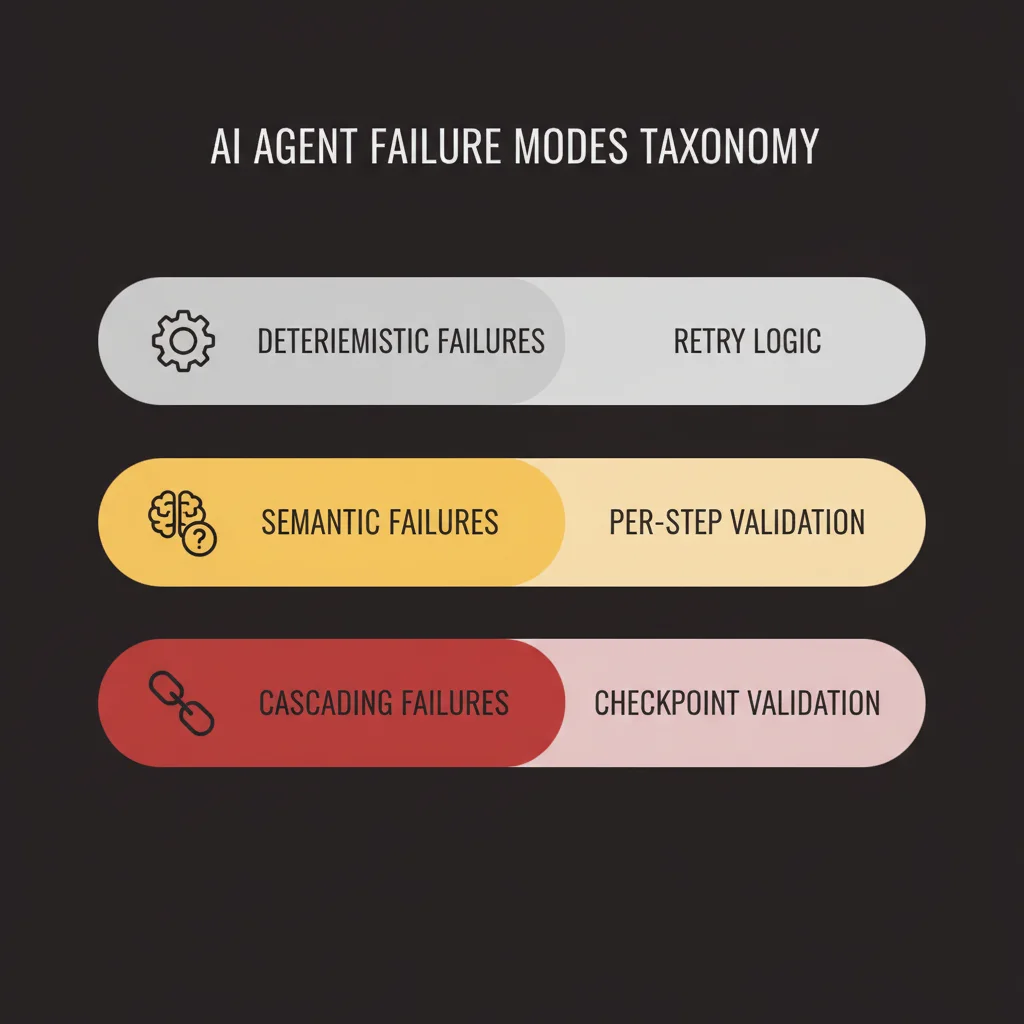
Agentic workflows fail in more ways than conventional software. The failure taxonomy is worth understanding before you design recovery logic.
Deterministic failures are standard software errors: a tool returns a 500, a database connection times out, an API rate limit fires. These are recoverable with standard retry logic. Use exponential backoff with jitter. Set maximum retry counts. Fail the step cleanly if retries are exhausted so the orchestrator can handle it rather than the agent spinning in a loop.
Semantic failures are specific to agent systems: the LLM produces a tool call with invalid parameters, extracts the wrong fields from a document, or makes a logical error in its reasoning that produces a bad intermediate result. These don’t raise exceptions. They produce wrong outputs that look like right outputs to the execution layer. This is the harder failure mode.
Cascading failures occur when a semantic failure at one step propagates through the workflow. The agent makes a wrong classification at step 2. Every subsequent step operates on that misclassification. The final output is confidently wrong. By the time you catch it, multiple tool calls have executed against bad premises.
Recovery patterns for each:
For deterministic failures, the recovery is retry-then-fail. Define retry budgets per tool. After exhausting retries, execute the fallback path: route to a human queue, substitute a degraded response, or fail the entire workflow with a structured error that downstream systems can handle. The key is that fallbacks are explicit in the workflow design, not handled by the agent’s judgment. Agents asked to “do your best” when a tool fails often hallucinate their way through it.
For semantic failures, the primary defense is per-step validation. After each step, verify the output against a schema or a set of explicit constraints before passing it to the next step. An extraction step should produce fields that match expected types and value ranges. A classification step should produce a class label that exists in your defined taxonomy. If the output doesn’t pass validation, the step fails and can be retried with a modified prompt or escalated to human review.
For cascading failures, the structural fix is checkpoint validation between major workflow phases. Don’t run 10 steps in a row and check the output at the end. Define workflow phases with explicit checkpoints. At each checkpoint, a validation step confirms the accumulated state is coherent before the next phase begins. This limits the blast radius of a semantic failure to one phase rather than the entire workflow.
Human escalation paths deserve explicit design attention. The question is not whether to include them — you should always include them. The question is where they trigger and what information they surface. A human reviewing an escalated workflow step needs the full context: what the agent was trying to do, what it did, what the output was, and why validation failed. Design the escalation interface before you design the agent, not after.
Pattern 4: Human-in-the-Loop Checkpoints
Full autonomy is appropriate for a narrower set of tasks than most teams initially assume. For most production workflows, human-in-the-loop (HITL) checkpoints are not a concession to safety concerns. They’re good architecture.
The decisions to make upfront: which actions require human approval, under what conditions, and what the approval interface looks like.
Where HITL checkpoints belong:
Actions that are irreversible or high-stakes. Sending external communications, modifying billing, deleting records, publishing content publicly. Until your agent’s error rate for these action types has been measured and validated against your tolerance threshold, require approval.
Decisions that cross a confidence threshold. If your agent produces a classification or extraction with a confidence score below a defined level, route to human review rather than proceeding. Most model APIs return logprobs or confidence signals you can use for this. Build confidence-based routing into your workflow from the start.
Novel inputs. If an incoming request doesn’t match the distribution your agent was designed for, a router that detects out-of-distribution inputs and escalates them prevents the agent from producing confident nonsense on inputs it wasn’t built to handle.
Scheduled review for high-volume decisions. Even actions the agent handles autonomously should pass through periodic human review. A support triage agent processing 1,000 tickets per day might operate fully autonomously on individual tickets but surface a daily batch of 20 randomly sampled decisions for quality review. This is how you catch behavioral drift before it accumulates into a larger problem.
Designing the approval interface:
The interface is not an afterthought. A HITL checkpoint that surfaces a wall of text with no structure will be approved reflexively rather than reviewed carefully. Design the approval interface to show the reviewer exactly what they need to make a good decision: the incoming request, the agent’s proposed action, the relevant context, and a clear approve/reject control with the option to modify the proposed action before approving.
Async approval flows that don’t block the workflow are worth the engineering investment. A workflow that pauses indefinitely waiting for human input is brittle in production. Build approval queues that the workflow polls, with timeout handling that escalates or fails gracefully if approval doesn’t arrive within a defined window.
Pattern 5: Observability for Agentic Workflows
Agentic workflows have an observability problem that conventional application monitoring doesn’t solve.
Standard logging captures events: request received, function called, response returned. For a deterministic service, that’s sufficient. For an agent workflow, you need more. You need the agent’s reasoning chain: what it observed, what it decided to do, why it made that decision, what tools it called, what those tools returned, and how it incorporated those results into its next decision.
Without that trace, debugging agent failures means guessing at what happened inside a non-deterministic system.
Structured traces for agent decisions:
Each agent decision should produce a structured trace event, not just a log line. The trace event captures: the step name, the input state, the model call (prompt, parameters, model version), the response (output text, tool calls), the tool call results if any, the validation outcome for this step’s output, and the next step the workflow transitioned to. This is more data than conventional logging, but it’s the minimum required to debug a non-trivial agent failure.
OpenTelemetry spans map well to agent steps. Each step becomes a span with the above fields as attributes. The trace root is the workflow invocation. Child spans are individual steps. Tool calls are child spans of the step that triggered them. This gives you end-to-end latency, step-level timing, and a hierarchical view of what the agent did during a given workflow execution.
Several observability platforms have built native support for LLM tracing (LangSmith, Braintrust, Helicone, Langfuse are examples). The specific tooling matters less than the commitment to capturing structured traces from the start. Retrofitting observability into a production agent is painful. Build it in from day one.
Evaluation loops:
Tracing tells you what happened. Evaluation tells you whether it was correct.
Building an eval loop requires three things: a dataset of representative inputs with expected behaviors, an evaluation function that scores outputs against those expectations, and a pipeline that runs evals on every deployment and surfaces regressions.
The evaluation function doesn’t need to compare exact strings. For most agent tasks, you’re evaluating categories of correctness: did the agent call the right tools? Did it extract the fields correctly? Did it route to the right path? Did the final output meet the requirements for this task type? LLM-based evaluation judges work well here — a grading model that evaluates the agent’s output against a rubric scales better than hand-coded evaluation logic.
In production, monitor the metrics that signal behavioral drift. For a classification agent: class distribution over time (sudden shifts indicate the agent’s classification behavior changed). For an extraction agent: field-level confidence scores (declining confidence on specific fields indicates a format change in incoming documents). For a response drafting agent: human approval rates (declining approval rates indicate the agent’s output quality degraded).
Frequently Asked Questions
Why do agentic workflows fail in production when they worked in demos?
Demo environments use clean, predictable inputs. Production exposes real failure modes: state contamination between runs, tool errors that don’t raise exceptions, semantic failures where the LLM extracts the wrong data silently, and context drift as the context window fills. The patterns that prevent these failures aren’t visible until you’re in production.
What’s the most important infrastructure piece for production agents?
Structured observability. Without traces that capture the agent’s reasoning chain — what it observed, decided, and did at each step — debugging failures means guessing inside a non-deterministic system. Build tracing before you build the agent, not after.
How do you handle the compounding accuracy problem in multi-step workflows?
Two ways: reduce steps where possible (fewer steps means less compounding), and add per-step validation that catches semantic failures before they propagate. An agent at 95% accuracy per step reaches only 60% final accuracy over 10 steps. Checkpoint validation limits the blast radius of any single step’s failure.
The Infrastructure You Need Before You Write the First Agent Call
The patterns above are only as good as the infrastructure they run on. Before writing the first LLM call in a production system, you need:
A state store. A place to persist workflow state between steps. Redis works for short-lived session state. A relational database or document store works for durable workflow state. The choice depends on your durability requirements, but something other than the context window is required.
A task queue. For async, long-running workflows, a task queue (Celery, BullMQ, Temporal, SQS) manages step execution, retry logic, and concurrency. Temporal or similar workflow orchestration tools are particularly well-suited to agent workflows because they handle distributed state, retries, and timeouts natively.
A tracing pipeline. OpenTelemetry instrumentation from the start. Whether you send traces to Datadog, Honeycomb, Grafana, or an LLM-specific platform is secondary. What matters is that you’re capturing structured traces before you have users.
An eval harness. A test runner that executes a representative dataset against the agent and scores outputs. A CI step that runs evals on every pull request to the agent’s code or prompts.
An LLM gateway. A layer in front of your model API calls that handles rate limiting, cost tracking, model routing, and caching. Without it, you’ll discover your cost structure in production under load rather than in design. LiteLLM and similar routing layers provide this as infrastructure rather than custom code.
Fallback paths for every tool. Before writing the agent logic, define what happens when each tool the agent depends on is unavailable. Some fallbacks are graceful degradation (proceed without the data, flag it as missing). Some are hard stops (if the payment API is down, don’t attempt to process payments). Define these before the agent goes to production.
This infrastructure list is not exotic. Most of these components exist in a mature production engineering organization. What’s different for agent systems is that they’re load-bearing from day one, not optional additions. An agent workflow without a state store is brittle. An agent without structured tracing is undebuggable. An agent without evals ships behavioral regressions invisibly.
The patterns described here apply regardless of which framework you use. LangGraph’s graph-based execution model, AutoGen’s multi-agent coordination, Temporal’s durable workflow primitives — each expresses these same patterns in its own idiom. The framework handles the plumbing. The architecture decisions are yours.
If your team is working through the infrastructure build for a production agent system and wants engineering support from people who’ve shipped these systems into production environments, that’s what we do. Get in touch to discuss your architecture.