Key Takeaway
Start with your users and your data, not with GPT-4. Map your data assets, find high-friction workflows, score by feasibility and impact, then ship one low-risk, high-visibility feature in 90 days.
Every SaaS executive has had the conversation. A board member, an investor, or a large customer asks some version of: “What’s your AI strategy?”
If you don’t have a good answer yet, you’re in the majority. Most product teams we talk to have a roadmap full of legitimate priorities and zero AI features on it. The pressure is real, but the path forward is unclear.
This is a solvable problem. Not with a hackathon or a chatbot bolted onto your dashboard. With a structured assessment of where AI creates genuine value in your product, and a disciplined approach to sequencing the work.
The wrong place to start
Most teams make the same mistakes when they finally decide to act on AI.
Starting with the technology. “We should use GPT-4 for something.” This is backwards. You wouldn’t pick a database before defining the data model. The same logic applies. Start with the user problem, not the model.
Starting with a chatbot. Conversational AI is visible and easy to demo. It’s also one of the hardest AI features to do well. Users have high expectations from ChatGPT. A mediocre product chatbot that hallucinates your pricing page will erode trust faster than having no AI at all.
Starting with a hackathon. Hackathons produce demos. Demos are not products. The gap between a working prototype and a production feature that handles edge cases, scales under load, and doesn’t break existing workflows is enormous. Two-day hackathons create excitement and then disappointment when nothing ships.
The right starting point is your users and your data. Where do your users waste time? What unique data does your product generate? Those two questions lead to better AI features than any technology-first brainstorm.
A four-step assessment framework
This is the AI product strategy framework we use with product teams. It takes about two weeks to complete properly, and it produces a prioritized list of AI features with clear sequencing.
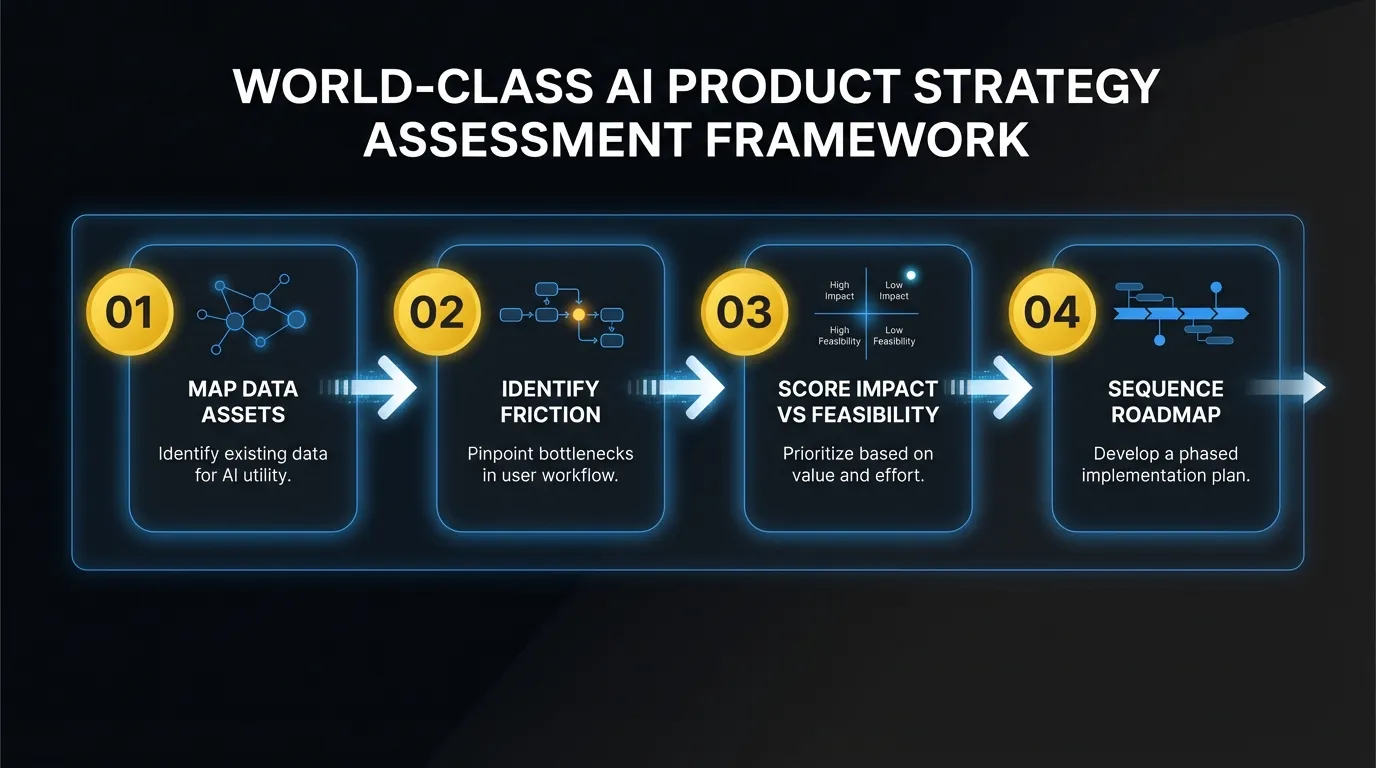
Step 1: Map your data assets
Every SaaS product sits on a pile of data that most teams undervalue. Before you evaluate any AI feature, you need a clear inventory of what you have.
Three categories matter:
Behavioral data. How users interact with your product. Click paths, feature usage frequency, session patterns, search queries, abandoned workflows. If you have 10,000+ active users, you have enough behavioral data to power predictive features.
Domain data. The content and structured information your users create inside the product. CRM records, project plans, support tickets, financial transactions, documents. This is your most defensible asset. No foundation model was trained on your customers’ proprietary workflow data.
Integration data. What flows in and out of your product via APIs, imports, and third-party connections. Calendar events, email metadata, Slack messages, Git commits. This data often contains signals your users can’t see because it’s fragmented across tools.
Map all three. Be specific. “We have user data” is not useful. “We have 18 months of task completion timestamps across 12,000 projects with priority labels and assignee data” is useful. That’s a dataset you can build predictions on.
Step 2: Identify high-friction workflows
AI is most valuable when it reduces friction in workflows that users perform repeatedly. You’re looking for tasks that are:
- Manual and repetitive. Users do the same pattern of clicks, copy-pastes, or data entry multiple times per day.
- Cognitively expensive but not creative. Categorizing, summarizing, extracting, or matching information requires attention but not judgment.
- Error-prone under volume. Tasks where mistakes increase as volume grows. Data entry, classification, and routing are classic examples.
Talk to your support team. Pull your product analytics. Look at where users spend the most time on tasks that don’t require human creativity or complex decision-making. Those are your AI candidates.
A project management tool might find that users spend 14 minutes on average writing task descriptions and acceptance criteria for each story. A billing platform might find that 30% of support tickets are about invoice categorization. A recruiting tool might find that recruiters spend 2 hours per role writing initial outreach messages.
Each of these is a concrete AI feature waiting to be built.
Step 3: Score by feasibility and impact
Not every AI candidate is worth pursuing. Plot your candidates on a 2x2 matrix.
Impact is measured by how many users are affected and how much time or friction is removed. A feature that saves 5 minutes per day for every user scores higher than one that saves 30 minutes per month for 10% of users.
Feasibility is measured by three factors:
- Data readiness. Do you have enough labeled data? Is it clean? Is it accessible through your existing infrastructure?
- Technical complexity. Can you use an API call to a foundation model with good prompt engineering, or do you need fine-tuning, custom training, or complex orchestration?
- Integration surface. How deeply does the feature need to integrate with your existing product? A standalone suggestion panel is simpler than rewriting your core workflow engine.
Score each candidate 1-5 on both axes. Features in the high-impact, high-feasibility quadrant are your starting list. Features that are high-impact but low-feasibility go on the 6-month roadmap. Low-impact features get cut regardless of feasibility.
Be honest about feasibility. Teams consistently underestimate the work required to go from “the API returns good results in my notebook” to “this feature works reliably for 50,000 users at scale.”
Step 4: Sequence the AI product roadmap
Your first AI feature should be low-risk and high-visibility. This is not the time to attempt the most ambitious feature on your list. You need a win that builds organizational confidence.
Low-risk means: it doesn’t touch a critical workflow, failure is graceful (the user can always do it manually), and the output is reviewable before it takes effect. Auto-generated draft content is low-risk. Automated financial transactions are not.
High-visibility means: users notice it, talk about it, and it shows up in your product marketing. A smart suggestion that appears in a workflow everyone uses daily is high-visibility. A background optimization that improves performance by 8% is not.
Ship the first feature. Measure adoption, accuracy, and user feedback. Then use what you learn to sequence the harder features with real data about what works in your product context.
Patterns that work across SaaS products
After working on AI integrations across dozens of products, certain patterns appear consistently. These are proven feature categories that map well to common SaaS data and workflows.
Smart defaults. Pre-filling form fields, suggesting configurations, or setting initial values based on the user’s history and similar users’ behavior. Low complexity, high adoption, and they compound over time as the model learns.
Automated categorization. Tagging support tickets, classifying transactions, labeling content, routing requests. These tasks are high-volume, tedious for humans, and well-suited to classification models. Start with a confidence threshold and only auto-apply above 90%. Let users correct the rest, and use those corrections as training data.
Predictive suggestions. Recommending next actions, flagging at-risk accounts, surfacing relevant content at the right moment. These require good behavioral data and a feedback loop, but they create the “this product knows me” feeling that drives retention.
Domain-specific content generation. Not generic writing. Content generation that uses your product’s structured data to produce output that’s specific to your domain. Auto-generated reports from analytics data. Draft responses based on ticket history and resolution patterns. Project summaries pulled from activity logs.
Anomaly detection. Flagging unusual patterns in data that humans would miss at scale. Billing anomalies, security events, usage spikes, performance degradation. These features often create the most immediate value for operations-heavy products.
What the first 90 days look like
A realistic timeline for getting your first AI feature into production:
Weeks 1-2: Assessment. Run the four-step framework above. Map data, identify candidates, score and prioritize. This requires product, engineering, and data team involvement. The output is a prioritized feature list and a decision on the first feature to build.
Weeks 3-4: Architecture. Design the technical approach for your first feature. Decide: API-based inference vs. fine-tuned model. Synchronous vs. asynchronous processing. How the feature integrates with your existing UI. Where the data pipeline connects. What the fallback looks like when the model returns low-confidence results.
Weeks 5-8: Build and ship. Build the feature, test it with internal users and a small beta group, iterate on accuracy and UX, and ship it. Four weeks is enough for a well-scoped first feature if your team stays focused. The temptation to expand scope will be strong. Resist it.
Weeks 9-12: Iterate and plan. Measure real usage data. What’s the adoption rate? Where does accuracy drop? What do users actually do with the output? Use these signals to improve the first feature and plan the second one. You now have production data to inform your AI product roadmap, not just assumptions.
After 90 days, you have a shipped AI feature, real performance data, and organizational muscle memory for how to build AI into your product. The second feature ships faster.

When to build internally vs. bring in expertise
The build-vs-buy-vs-partner decision depends on your team’s current capabilities and how fast you need to move.
Build internally when you have ML engineers or strong backend engineers with AI experience on staff, your first feature is straightforward (API-based, well-defined scope), and your timeline is flexible enough to account for the learning curve.
Bring in outside expertise when your engineering team is strong but doesn’t have AI-specific experience, the competitive pressure requires shipping in weeks rather than quarters, or you need help with the strategic assessment before you can define what to build. A fractional AI team that embeds into your existing engineering org can compress the learning curve from months to weeks. The key is finding partners who work inside your codebase and your process, not ones who disappear into a black box and return with a deliverable.
The worst option is doing nothing while you debate the decision. Your competitors are not waiting. The gap between “has AI features” and “doesn’t have AI features” is already showing up in competitive deals and customer retention. Pick a path. Start the assessment. Ship something in 90 days.
The companies that win the next phase of SaaS aren’t the ones with the most sophisticated models. They’re the ones who found the right user problems, applied AI to them thoughtfully, and shipped before the market moved on.
Frequently Asked Questions
Where should I start if my product has no AI features?
Start with your users and your data. Map your data assets (behavioral, domain, integration data). Identify high-friction workflows where users perform repetitive tasks. Score candidates by feasibility and impact. Then ship one low-risk, high-visibility feature in 90 days. Don’t start with the technology or a chatbot.
How do I know which AI feature to build first?
Pick the one that scores highest on three dimensions: user impact (how many users, how often), data readiness (do you have the training data today), and implementation complexity (can you ship in under 4 weeks). Smart defaults and auto-categorization almost always land in the high-impact, data-ready, low-complexity sweet spot.
How long does it take to ship a first AI feature?
About 90 days from assessment to production. Weeks 1-2 for assessment and prioritization. Weeks 3-4 for architecture. Weeks 5-8 for build and ship. Weeks 9-12 for iteration based on real usage data. The second feature ships faster because architecture decisions and team knowledge carry forward.
Ready to build your AI product strategy? Talk to us about where AI creates the most value in your product.