Key Takeaway
Seeing a late truck is cheap now. The money goes into coordinating everything after it, so automate that first: a workflow that turns one exception signal into actions across the TMS, WMS, carrier and customer, with a person approving anything that costs money.
Logistics teams can see exceptions faster than ever. They still coordinate them by email and phone. This article is for operations and IT leaders at carriers, brokers and 3PLs (third-party logistics providers) who want to automate the work that happens after the alert: who owns it, which systems change, and who gets told.
At 6:40 a.m., a telematics alert shows a linehaul truck two hours behind schedule. The load is due at a customer DC (distribution center) with a 9:00 dock appointment.
Here’s what usually happens next. A dispatcher sees the alert in the telematics portal and calls the driver. A customer service rep, who doesn’t have that portal open, gets an email from the customer asking where the load is. Someone checks the TMS (transportation management system), which still shows the original ETA because the carrier’s EDI (electronic data interchange) status update hasn’t arrived. The destination warehouse finds out when the truck misses the appointment. Someone rebooks the slot by hand in the customer’s scheduling portal. Two weeks later a detention charge shows up on the carrier invoice, and someone in billing has to piece together what happened from an email thread.
One exception. Three or four people. Four or five systems. Most of the effort went into finding out, relaying and re-typing.
The industry has spent heavily on seeing exceptions: real-time visibility, telematics, control-tower dashboards. Those tools help. But the bottleneck has moved. Knowing the truck is late is cheap now. What still costs money is coordinating everything that has to happen because it’s late.
That coordination is what logistics teams should automate first. Not with another screen for dispatchers, but with workflows that take an exception signal and drive the next action across the TMS, the WMS (warehouse management system), the carrier and the customer, with a person approving the decisions that carry cost.
Why do exceptions eat so much of the margin in logistics?
Exceptions are a small share of volume and a large share of the work. Most freight moves without trouble. The exceptions carry the costs that don’t show up in the rate: detention and demurrage, re-delivery, expedited freight, retailer compliance chargebacks for missed windows or bad ASNs (advance ship notices), and the customer service time to explain all of it.
They’re expensive to coordinate for structural reasons.
The signal lands in one place and the action happens in another. An ELD (electronic logging device) or telematics event, an EDI 214 status message, a carrier email, a WMS receiving discrepancy. Each one arrives in a different tool, watched by a different team.
Ownership is unclear. A late inbound load belongs to dispatch, the warehouse, customer service and the account manager all at once. In practice that means it belongs to whoever notices first.
Partners sit outside your systems. Carriers, brokers, customs brokers and customers all have their own portals and inboxes. A lot of exception handling is copying information out of one company’s system into an email to another company.
Much of it is unstructured. Carrier updates often arrive as free-text emails. “Driver had a breakdown near Kingston, ETA 1400.” That doesn’t parse into the TMS on its own.
That’s why another dashboard won’t fix it. A dashboard improves detection. The cost sits in triage, coordination and closure.
What types of logistics exceptions should you track?
Start by naming the exceptions you actually handle. Most operations can sort the bulk of their volume into about six types.
| Exception type | Typical trigger | Who gets pulled in | Systems involved | Cost if mishandled |
|---|---|---|---|---|
| Late pickup or delivery | Telematics ETA, missed EDI 214, carrier email | Dispatch, CS, destination warehouse | Telematics, TMS, dock scheduling, email | Missed appointment, detention, retailer fines |
| Tender rejection | EDI 990 decline, carrier no-response | Dispatch, carrier sales | TMS, load board, email | Spot premium, missed pickup |
| Over, short and damaged (OS&D) | WMS receipt vs. ASN or BOL | Warehouse, CS, claims | WMS, EDI 856, photos, claims system | Unrecovered claims, chargebacks |
| Customs hold | Broker notification | Customs broker, CS, customer | Broker portal, email, TMS | Storage, demurrage, missed delivery |
| Appointment conflict | Dock schedule change, early arrival | Yard, warehouse, carrier | YMS, scheduling portal, phone | Detention, overtime |
| Billing dispute | Invoice line vs. rate or accessorial | Billing, carrier, operations | TMS, freight audit, email | Overpayment, write-offs |
For each type, estimate two numbers: how many happen per week, and how many minutes of people time each one takes from detection to closure. Multiply them. The biggest total is rarely the most dramatic type. It’s usually a routine one, like late deliveries or OS&D, that happens dozens of times a day.
How do you map an exception journey?
Pick one exception type and trace the path the exception takes, separate from the shipment’s happy path. Every exception goes through the same seven stages, whether a person or a system handles them.
- Detect. Which signal first shows a problem, and in which system?
- Classify. What type is it, how severe, and does it need action at all? (A 20-minute delay against a 4-hour window may not.)
- Assign. Who owns it? A named role, not “the team.”
- Decide. What are the options? Reschedule, re-route, expedite, accept and notify. Who can approve which ones?
- Act. What has to change, and in which systems? New appointment, updated TMS ETA, revised ASN, carrier instruction.
- Notify. Who outside the building needs to know, and through which channel?
- Close and learn. What gets recorded so billing, claims and carrier scorecards can use it later?
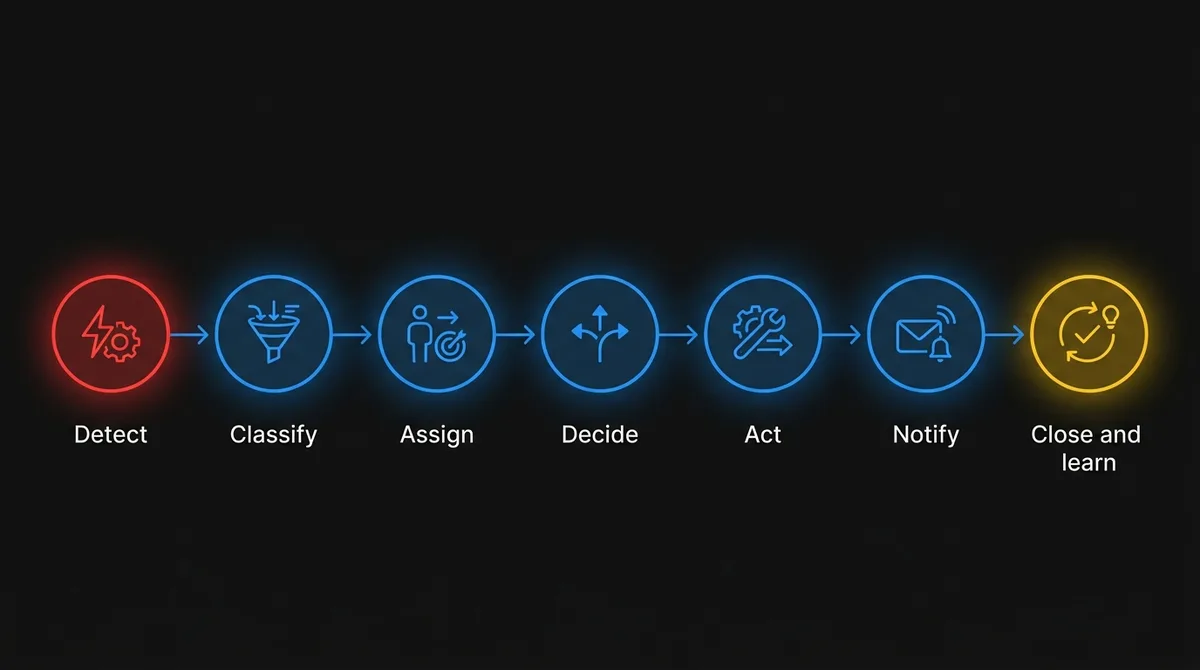
For your chosen exception, write down who does each stage today, in which system, and how long it takes. You’ll find stages nobody does on purpose. Classification often happens in someone’s head. Closure often doesn’t happen at all, which is why detention disputes are so hard to win.
How do you know which systems you can automate?
Draw an integration map. The exception journey tells you what needs to happen. The integration map tells you whether you can automate it. List every system on the journey and answer three questions for each.
| System | Can we read events from it? | Can we write actions to it? | How? |
|---|---|---|---|
| Telematics / ELD | Usually yes | Rarely needed | Vendor API, webhooks |
| TMS | Yes | Yes, with care | API, database, or EDI |
| WMS | Yes | Sometimes | API or integration middleware |
| Dock scheduling / YMS | Sometimes | Sometimes | API, or the customer’s portal (often manual) |
| Carrier and customer EDI | Yes (204, 214, 990, 856, 210) | Yes | VAN or EDI provider |
| Email inboxes | Yes | Yes (drafts) | Mail API with a shared mailbox |
| Customer portals | Often no | Often no | Manual, or browser automation as a last resort |
You don’t need to integrate everything. Look for the shortest path where a signal from one system can trigger a decision and an action in another, without a person copying data between them. If the critical system on the journey is a customer portal with no API, pick a different exception for your first project.
Where does AI fit in logistics exception handling?
AI belongs at the stages where people currently read, interpret and write. Plenty of exception automation is plain rules and integration: if the telematics ETA is later than the appointment window minus 30 minutes, open an exception and assign it to dispatch. Build those rules first. They’re transparent and cheap to run.
After that, AI earns its place in five spots:
- Reading unstructured inputs. Parsing carrier emails, driver messages and broker notifications into a structured exception: shipment, type, cause, new ETA.
- Classification and severity. Combining the signal with context (customer, appointment window, penalty terms, lane history) to decide whether a person needs to act now, later or not at all.
- Option generation. Proposing next actions. “Next open slot at destination is 13:00. Customer’s routing guide allows one reschedule without penalty. Draft request attached.”
- Drafting communications. Customer notifications, carrier instructions and internal handover notes, written from the structured record so everyone gets the same facts.
- Closure records. Summarizing what happened, with timestamps, for billing and carrier scorecards.
The rule we design around: agents coordinate, and people approve anything that commits money or changes a promise to a customer. An agent drafts the reschedule request. A dispatcher clicks send. An agent flags detention exposure. A person decides whether to dispute it.
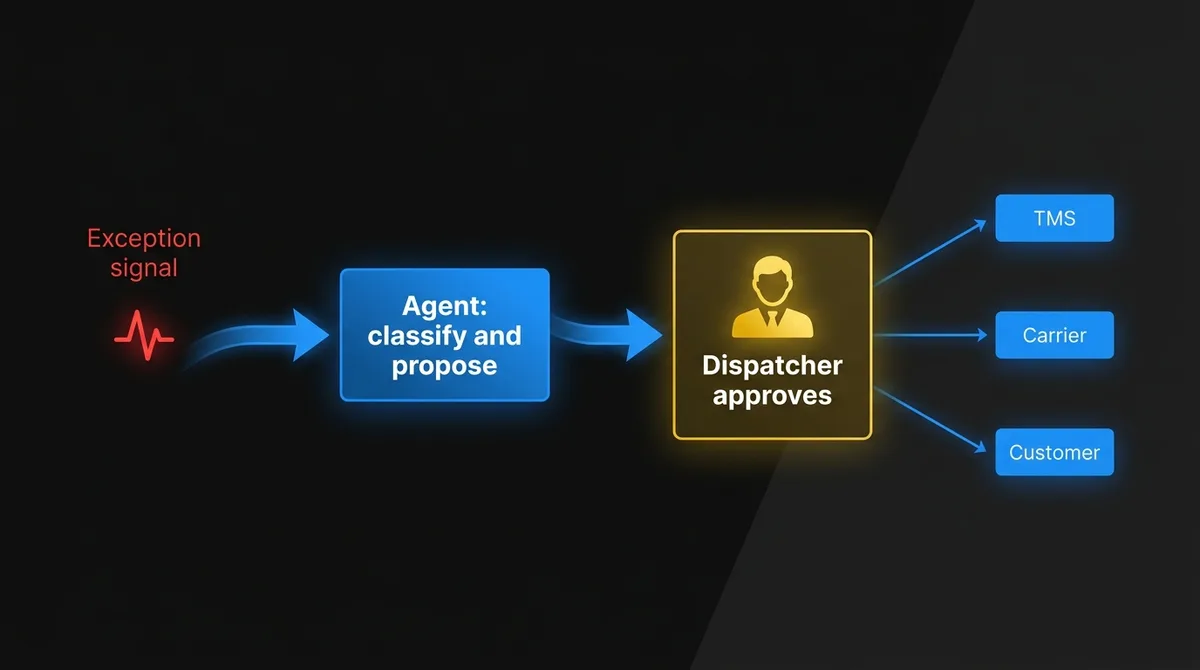
That checkpoint keeps the system safe while it learns, and the approval history tells you which actions you can fully automate later. For the engineering side, including state management and failure handling in long-running agent workflows, see AI agent architecture: what production systems actually look like.
What does exception orchestration look like at a 3PL?
Here’s an illustrative example built around late inbound loads. The figures are made up, but the pattern fits most asset-light carriers, brokers and 3PLs.
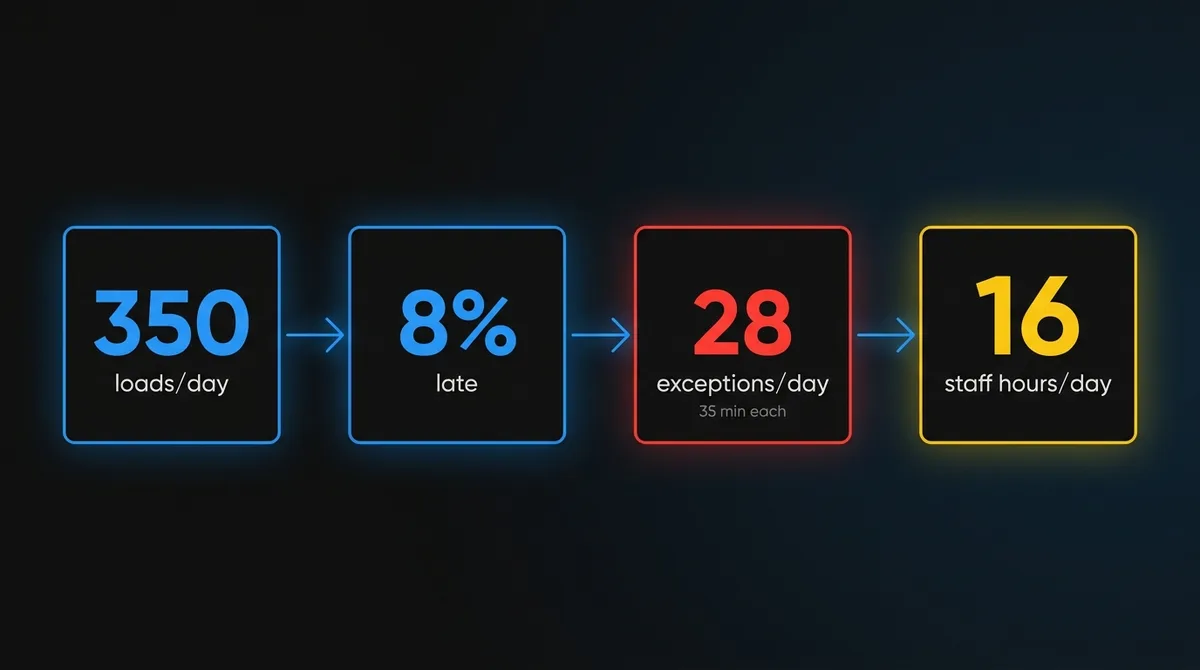
The operation. A 3PL managing inbound freight for several retail and CPG (consumer packaged goods) customers into two Canadian DCs. About 350 inbound loads a day across dozens of carriers.
The exception. Late inbound loads that put a dock appointment at risk. About 8% of loads, or 28 a day.
Today. Each one takes around 35 minutes of combined time across dispatch, customer service and the DC scheduler: chasing the carrier, rebooking the slot, updating the TMS, emailing the customer. That’s roughly 16 staff hours a day. Some still miss the appointment and generate detention charges and retailer fines that are hard to dispute, because nobody recorded the timeline.
The milestone. For one DC and the top ten carriers by volume:
- Ingest telematics ETAs, EDI 214 messages and the carrier mailbox
- Open a structured exception automatically when the ETA threatens the appointment
- Propose a new slot from the DC schedule and draft the carrier and customer messages
- Route to the dispatcher for one-click approval, then update the TMS and log the timeline
The measures. Minutes of staff time per exception. Time from first signal to customer notification. Share of at-risk loads rescheduled before the original appointment. Detention dollars disputed with a complete timeline.
What’s hard. Matching carrier emails to the right shipment when reference numbers are missing or wrong. Getting write access to the dock scheduling system. Agreeing on which customers can receive automated notifications. All three are integration and process work, and they set the timeline far more than the model does.
Once every exception has a logged timeline, the operation can see which carriers and lanes generate the most rework. That feeds better carrier scorecards and better tendering decisions. It’s a separate project, but you couldn’t attempt it without the data.
How do you measure whether exception automation works?
Track the exception, not the shipment. Four numbers tell you most of what you need.
- Touches per exception. How many people and systems handled it. The target is one person, one approval.
- Time to first action. From the first signal to the first meaningful step. This is where automated detection and classification show up.
- Time to close. From detection to a complete record. Exceptions that never close are invisible costs.
- Avoidable cost. Detention, fines and expedites on exceptions you caught early enough to prevent.
Agents in production also need monitoring beyond uptime: how often their proposals get accepted, edited or rejected, and why. We cover that in AI agent observability: what monitoring looks like in production. If you’re also trying to get operational data into better planning decisions, which is a related but different problem, see from data to value.
Who should build exception automation?
Usually not the logistics IT team alone, because it’s already fully booked. Small IT teams spend their weeks on EDI onboarding, TMS upgrades and customer integrations. Exception automation cuts across all of those systems, so it keeps getting pushed to next quarter.
Chrono Innovation’s senior AI engineers embed with your team to build it. They work in your TMS and integration stack, on your release cycle, next to the people who know which carriers send what. They ship the first exception workflow to production with your team, and your team owns it afterward.
Frequently Asked Questions
Which logistics exception should we automate first?
The one with the largest weekly total of people minutes, which is usually a routine type like late deliveries or OS&D. Skip any exception whose critical step depends on a customer portal with no API.
Do we need AI to automate exception handling?
Not for every step. Rules and integrations handle detection and routing well. AI is worth adding where people read free-text emails, judge severity, propose options and draft messages.
Can an AI agent reschedule loads or dispute charges on its own?
Not at first. Agents should draft and propose, and a person should approve anything that commits money or changes a customer commitment. The approval history shows you which actions are safe to automate fully later.
Where should you start with exception automation?
With one exception that takes three people and four systems to resolve. You probably know which one it is already.
If you want a second set of eyes on it, we’ll run a process-friction review with you. We map one exception journey and its integration points, size the time and cost it eats, and define a scoped milestone your team could have in production within a quarter. Book a friction review.