Key Takeaway
AI governance for product teams boils down to five things: input/output logging, bias detection, audit trails, data privacy controls, and model versioning. Scale each one to your feature's risk tier and automate as much as possible.
Most conversations about AI governance start in the wrong place. They start with regulation, frameworks, and policy documents written by people who’ve never shipped a production AI feature. Product teams tune out. Understandably.
Governance isn’t a compliance exercise bolted onto your release process. For engineering and product teams at SaaS companies, governance is the set of decisions you make about how your AI features behave when nobody is watching. What happens when the model hallucinates. What happens when a user feeds PII into a prompt. What happens when a customer’s legal team asks why your system made a specific recommendation. These are product engineering problems, not legal ones.
This article is a practical guide for CTOs and engineering leaders at 50 to 200 person SaaS companies shipping AI features. No policy templates. No compliance checklists. Just the specific things your team needs to build, monitor, and document.
What does AI governance look like at the product team level?
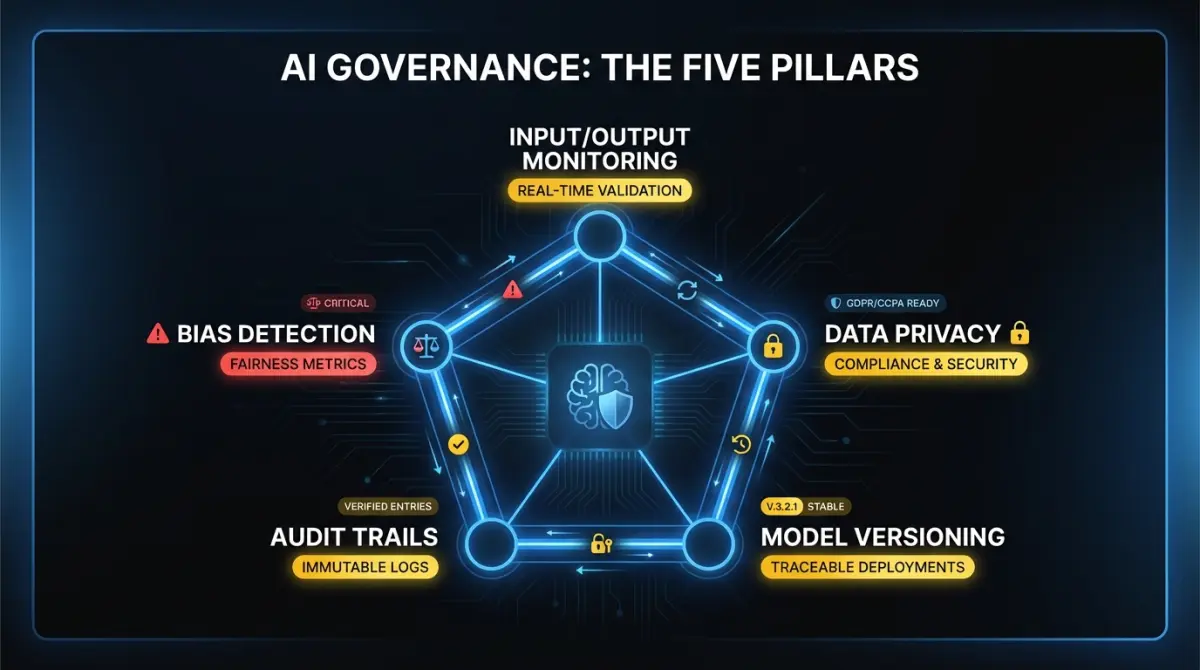
Strip away the regulatory language and AI governance for a product team comes down to five concerns.
Input/output monitoring. Every AI feature in production should log what goes in and what comes out. Not for compliance. For debugging, quality assurance, and incident response. When a customer reports a bad recommendation, you need the exact input and exact output to diagnose whether the problem is the prompt, the model, the context retrieval, or a tool integration. Teams that skip this end up reproducing bugs by guessing.
Bias detection. If your AI feature makes decisions that affect users differently based on protected characteristics, you need to measure that. This applies to recommendation engines, scoring systems, content moderation, and any feature that ranks, filters, or classifies people. For features that process documents or generate text, bias testing is less critical. You can defer it.
Audit trails for agent decisions. If you’re building agentic AI features, every tool call, every reasoning step, and every decision point needs a trace. Agents that operate over multiple steps and take actions on behalf of users create accountability gaps if you can’t reconstruct their decision chain after the fact.
Data privacy in AI pipelines. Where does customer data go when it enters your AI pipeline? Does it leave your infrastructure? Does the model provider retain it for training? If you’re running a multi-tenant system, can one customer’s data influence responses for another? These are architecture questions that become legal questions fast if you don’t answer them upfront.
Model versioning. When you update a model or change a prompt template, you need to know what version produced which outputs. A customer complaint from last Tuesday needs to be traceable to the exact model configuration running at that time. Pin your model versions. Tag your prompt templates. Treat your AI pipeline with the same versioning discipline you apply to your application code.
What regulations actually apply to your SaaS product?
Regulation is catching up to AI faster than most product teams realize. You don’t need to become a regulatory expert, but you do need to know which rules apply to your product and what they require.
EU AI Act. This is the most comprehensive AI regulation in force. It uses a risk-tiered approach. Most B2B SaaS products fall into the “limited risk” or “minimal risk” categories, which carry lighter obligations. If your product scores or ranks people (hiring tools, credit scoring, insurance), you’re likely in the “high risk” tier. That means mandatory conformity assessments, documentation requirements, and human oversight obligations. If your product generates text, images, or recommendations without ranking people, you’re probably in limited risk territory. The key obligation there is transparency. Users need to know they’re interacting with AI.
US state privacy laws. There’s no federal AI law in the US, but state laws are filling the gap. California’s CCPA gives consumers rights over personal information used in automated decision-making. Colorado’s AI Act, effective in 2026, requires deployers of “high-risk AI systems” to conduct impact assessments and provide notice to consumers. Virginia, Connecticut, and Texas have similar provisions. The pattern: if your AI feature makes consequential decisions about people, you need documentation, notice, and in some cases opt-out mechanisms.
Canada’s AIDA. The Artificial Intelligence and Data Act is still working through parliament. The current draft creates obligations for “high-impact” AI systems similar to the EU’s high-risk tier. It’s not law yet, but if you sell to Canadian companies or process Canadian user data, your governance infrastructure should be ready to adapt. Building audit trails and impact assessments now means you won’t be scrambling when the final version passes.
The practical takeaway across all three jurisdictions: transparency, documentation, and human oversight for high-stakes decisions. Build those into your product now and you’re compliant with most of what’s coming.
What guardrails do you need in production?
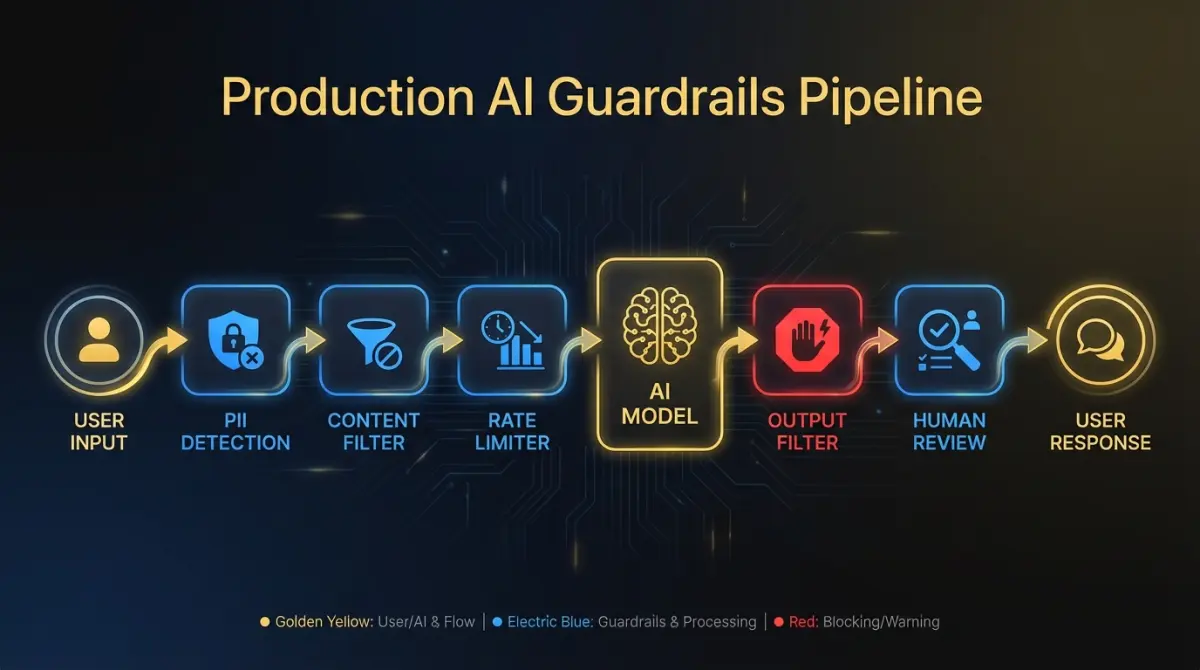
Guardrails are runtime checks that prevent your AI features from doing something harmful, embarrassing, or expensive. They operate at the boundary between your system and the model, and between the model and the user.
Content filtering on outputs. Every customer-facing AI response should pass through a filter that catches harmful content, off-topic responses, and content that contradicts your product’s domain. This doesn’t need to be a separate model call. Pattern matching and classification on the output text catches most problems. Save the expensive model-based evaluation for high-stakes features.
PII detection in prompts and responses. Users will paste sensitive data into AI features. Social security numbers, credit card numbers, internal credentials. Your system should detect PII on the input side before it reaches the model, and on the output side before it reaches the user. Libraries like Microsoft Presidio handle the detection. Your job is deciding what to do when PII is found: redact, block, or warn.
Rate limiting. AI features are expensive to run and easy to abuse. Per-user and per-tenant rate limits protect both your infrastructure costs and your customers from runaway agent loops. A well-designed agent that enters an infinite tool-call cycle can burn through thousands of dollars in API costs in minutes without rate limiting.
Human-in-the-loop for high-stakes decisions. Any AI action that is expensive, irreversible, or affects another person should require human confirmation before execution. Sending an email on behalf of a user. Modifying a financial record. Deleting data. The threshold for “high-stakes” depends on your product, but the principle is universal: the higher the cost of an error, the more important the human checkpoint.
Confidence thresholds for agent actions. If your AI agents produce confidence scores, use them. Set a threshold below which the agent defers to a human or takes a conservative default action. A classification agent that’s 60% confident should not take the same action as one that’s 95% confident. Make confidence-based routing a first-class feature of your agent architecture.
How should you approach bias testing?
Bias testing sounds like a compliance obligation. In practice, it’s a product quality discipline that prevents your AI from treating users unfairly in ways that damage trust and create legal exposure.
When bias testing is essential. Any feature that scores, ranks, filters, or classifies people. Recommendation engines that determine what users see. Screening tools that determine who gets access. Pricing algorithms that calculate different rates. If the output of your AI feature materially affects a person’s experience or opportunity, bias testing is non-negotiable.
When bias testing is lower priority. Text generation features, code assistants, document summarization, internal tooling that doesn’t affect end users. These features can have quality problems, but demographic bias is rarely the primary risk. Focus your bias testing investment where the impact is highest.
Building evaluation sets. Create test datasets that include demographic variation across the dimensions relevant to your product. For a hiring tool, that means candidates with equivalent qualifications but different names, genders, and backgrounds. For a lending product, equivalent financial profiles with different demographic signals. The evaluation set should be large enough to detect statistically significant differences. Fifty examples per demographic group is a minimum. Two hundred is better.
Metrics to track. Demographic parity measures whether outcomes are distributed proportionally across groups. Equalized odds measures whether error rates are consistent across groups. A model with 90% accuracy overall but 95% accuracy for one group and 70% for another has an equalized odds problem. Track both metrics. Report them to your product leadership quarterly.
Integrating bias testing into CI/CD. Run bias evaluations on every model update and every significant prompt change. Treat a regression in fairness metrics the same way you treat a regression in unit tests: block the deploy until it’s resolved.
How do you build audit trails and explainability?
Someone will ask why your system did what it did. A customer, a regulator, your own leadership team during an incident review. The time to prepare for that question is before it’s asked.
Logging agent reasoning chains. For agentic features, log the full decision sequence: the initial prompt, each tool call with its input and output, the model’s reasoning at each step, and the final action. Store these traces in a queryable format. When someone asks “why did the system recommend X,” you should be able to pull up the exact trace and walk through the reasoning in under five minutes.
Storing tool-call sequences. If your AI agents interact with external systems, log every API call the agent makes. Not just the successful ones. Failed calls, retries, and timeout events are where most production bugs live. Integrate these logs with your existing observability stack so agent behavior shows up alongside your application metrics.
Making decisions reproducible. Pin your model versions. Store the exact prompt template used for each request. If you use retrieval-augmented generation, log which documents were retrieved and their relevance scores. Reproducibility matters for debugging and for demonstrating to auditors that your system behaves consistently. A request from last month should produce an explainable result when you replay it with the same inputs and model version.
Retention policy. Decide how long you keep AI decision logs. Regulatory requirements vary. GDPR’s data minimization principle means you shouldn’t keep logs indefinitely. A reasonable default for most SaaS products: 90 days for full traces, 12 months for summary-level audit records. Adjust based on your industry and regulatory environment.
What does data governance look like in AI pipelines?
Data governance for AI isn’t a separate discipline from your existing data management. It’s your existing data governance applied to a new category of data flow that moves faster and has more places to leak.
Map your data flows. Document exactly what customer data enters your AI pipeline, where it’s processed, and where it’s stored. If you use a third-party model API, your customer data leaves your infrastructure. That changes your data processing agreements, your security posture, and potentially your compliance obligations. Draw the diagram. Share it with your security team.
Training data boundaries. Most commercial model APIs (OpenAI, Anthropic, Google) offer options to prevent customer data from being used for model training. Enable those options. Confirm them contractually. Your customers will ask, and “we think so” is not an acceptable answer. When you integrate AI into an existing product, data governance is one of the first architecture decisions to lock down.
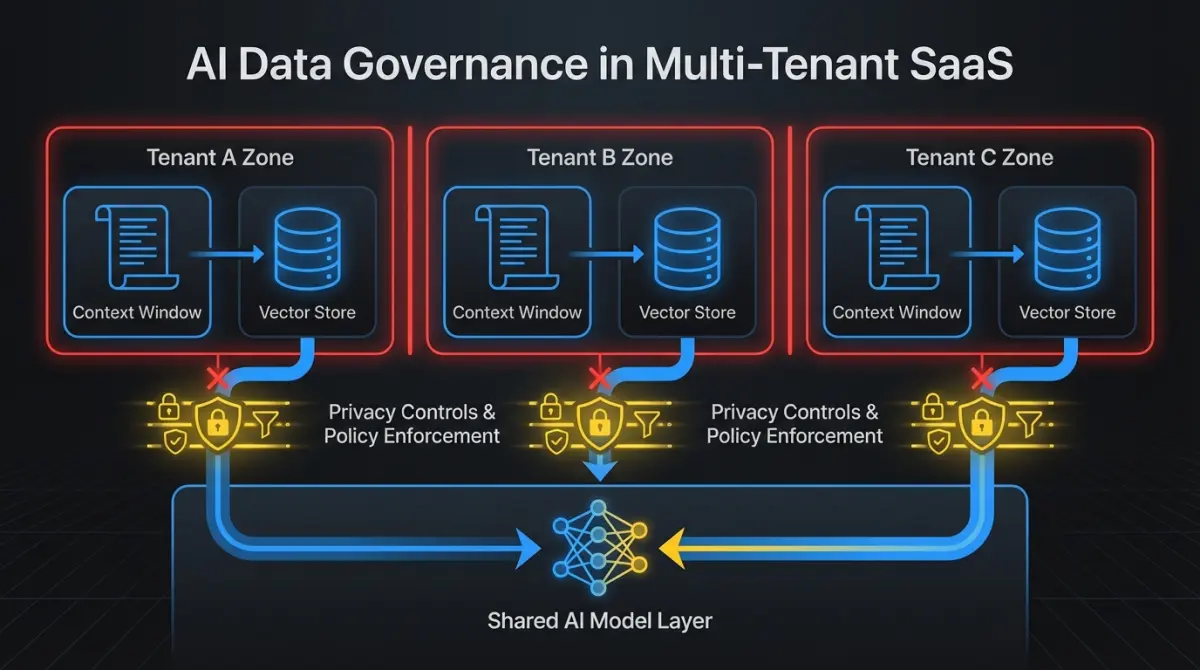
Multi-tenant isolation. If you run a multi-tenant SaaS product, ensure that one customer’s data cannot influence AI responses for another customer. This means separate context windows, separate retrieval indices, and no shared fine-tuning data. In RAG architectures, tenant isolation in your vector store is as important as tenant isolation in your application database. A data leak between tenants through your AI pipeline is the same as a data leak through any other pathway. Treat it with the same rigor.
Data residency. Some customers require their data to stay in specific geographic regions. If your AI pipeline routes data through model providers in other jurisdictions, you have a residency problem. Confirm where your model inference runs. Consider self-hosted or regional model deployments for customers with strict residency requirements.
How do you minimize the governance tax on velocity?
Every governance measure adds friction to your development process. Logging slows down responses. Bias testing adds time to your release cycle. Content filtering adds latency to every request. This is real, and teams that ignore the cost end up either abandoning governance or abandoning velocity.
The mistake most teams make is binary thinking: either do nothing (which works until it doesn’t) or implement every governance measure from day one (which slows you to a crawl).
Scale governance with your risk profile. An internal tool that summarizes meeting notes needs input/output logging and basic content filtering. That’s it. A customer-facing agent that takes actions on behalf of users needs the full stack: audit trails, bias testing, PII detection, confidence thresholds, human-in-the-loop checkpoints.
Classify your AI features by risk tier. Borrow the EU AI Act’s framework even if you’re not subject to it. Assign each feature to a tier: minimal risk (internal tools, text generation), limited risk (customer-facing recommendations, content generation), high risk (scoring, ranking, or decisions affecting people). Apply governance proportionally.
Automate what you can. PII detection, content filtering, and audit logging should be infrastructure, not manual process. Build them into your AI middleware layer so every feature gets baseline governance without feature teams doing extra work. Bias testing should run in CI/CD, not in a quarterly manual review.
Budget for it. Governance adds 10 to 20% overhead to AI feature development, depending on the risk tier. That’s the cost of shipping AI features that don’t blow up. Factor it into your sprint planning and your infrastructure budget. Teams that treat governance as “extra work” defer it indefinitely. Teams that budget for it ship it.
The companies that get this right don’t have larger governance teams. They have better infrastructure. Governance checks that run automatically on every request are cheaper and more reliable than governance reviews that happen manually before every release. Invest in the infrastructure early. It pays for itself the first time a customer asks how your AI makes decisions and you can answer in five minutes instead of five days.
FAQ
What’s the minimum governance setup for a low-risk AI feature?
Input/output logging and basic content filtering. If the feature generates text or recommendations for internal use, these two controls cover your primary risks. Add PII detection if users can enter free-form text. You don’t need bias testing or full audit trails for minimal-risk features.
How much does AI governance slow down development?
Expect 10 to 20% overhead on AI feature development. Most of that cost is upfront. Once you build governance into your AI middleware layer (logging, PII detection, content filtering as shared infrastructure), individual features get baseline coverage with minimal extra effort. The ongoing cost is bias testing and audit trail maintenance for high-risk features.
Do Canadian SaaS companies need to comply with the EU AI Act?
If you sell to EU customers or process EU user data, yes. The EU AI Act applies based on where your users are, not where your company is headquartered. Most B2B SaaS products fall into the limited or minimal risk tiers, which require transparency (telling users they’re interacting with AI) and basic documentation. High-risk products (scoring, ranking, or classifying people) face stricter requirements.
Building governance into your AI features is an investment that compounds. The earlier you start, the less painful it is. If your team needs help designing AI governance infrastructure or shipping AI features with the right guardrails, get in touch. We work with SaaS companies to build AI systems that hold up in production.