Most writing about AI agents explains what they could do. Very little describes what agents actually do inside products that real users depend on every day.
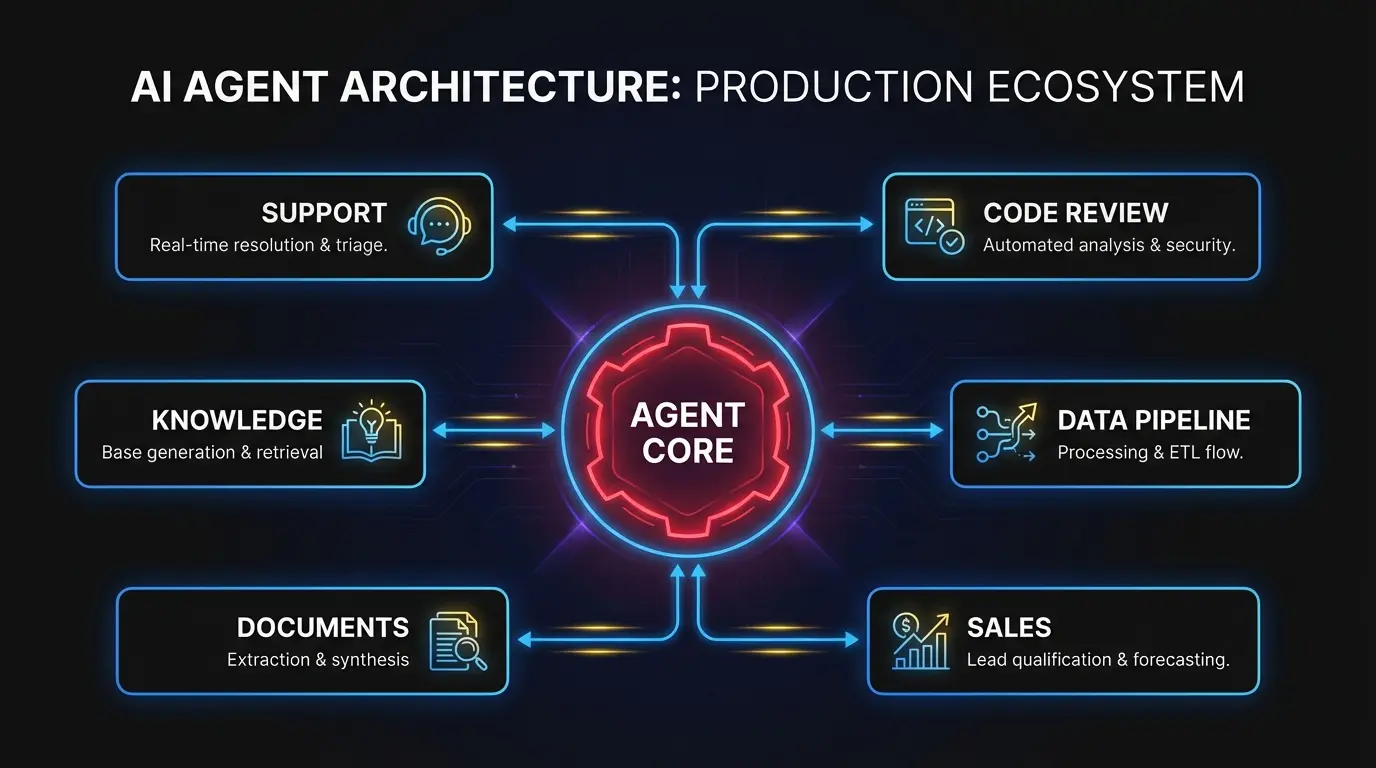
This is the concrete version. Six types of AI agents running in production, with specifics on what they replace, how they work, and where they break down. If you’re evaluating where agents fit inside your product, this is the reference.
For background on the architectural patterns behind these systems, see our guide on building AI agents that work in production.
1. Customer operations agents
What they do: Classify incoming support tickets, draft responses, route complex issues to the right specialist, and escalate when confidence is low.
What they replaced: Manual triage. A human read every ticket, assigned a category, forwarded it to a queue. In a 500-ticket-per-day operation, triage alone consumed 3-4 full-time reps.
A good customer operations agent reads the ticket, checks the customer’s account history, and classifies the issue by type, severity, and likely resolution path. For common issues like password resets, billing questions, and feature explanations, it drafts a response from a vetted knowledge base and presents it to a human for review. For anything ambiguous, it routes to a specialist with relevant context attached.
What makes it work: Retrieval-augmented generation against a curated knowledge base. Not the raw internet. The agent queries internal documentation, past ticket resolutions, and product-specific FAQs. It also uses structured tool calls to pull account data from the CRM or billing system, so responses reference the customer’s actual subscription tier or recent activity.
What makes it fail: Stale documentation. If your knowledge base is six months out of date, the agent confidently drafts wrong answers. The human review step catches most of these, but the fix is upstream: keep the knowledge base current, or the agent degrades quietly.
Typical outcome: 40-60% of tickets get an agent-drafted response that a human approves without edits. First-response time drops from hours to minutes. The support team spends its time on hard problems instead of repetitive ones.
2. Code review and CI/CD agents
What they do: Review pull requests for bugs, style violations, security issues, and test coverage gaps. Some generate suggested fixes inline. Others produce test cases for new code paths.
What they replaced: The first-pass review a senior engineer does before diving into design-level feedback. In a team of 12 engineers producing 30+ PRs per week, this review layer consumed 8-10 hours of senior engineering time.
The agent reads the diff, checks it against the project’s linting rules and style guide, scans for known vulnerability patterns, and flags anything that looks wrong. Better implementations also check whether the change has corresponding tests and generate skeleton test cases for untested paths.
What makes it work: Context window management. A useful code review agent doesn’t just read the diff. It loads the surrounding file context, related type definitions, and recent changes to the same files. Without that context, the agent flags false positives constantly because it can’t distinguish between a bug and an intentional pattern used throughout the codebase.
Tool integration matters too. The agent needs to run linters, type checkers, and test suites as part of its review loop. Not just reason about code statically. An agent that can execute npm test and report which tests fail is far more useful than one that guesses.
What makes it fail: Over-confidence on design decisions. Code review agents catch bugs and enforce patterns well. They’re weak at evaluating whether an architectural choice is the right one. Teams that treat agent reviews as a replacement for senior design review end up with code that passes every check but has structural problems.
Typical outcome: 70% of first-pass review comments come from the agent. Senior engineers focus review time on architecture and design. PR merge time drops by a day on average because the feedback loop on mechanical issues is instant.
3. Data pipeline agents
What they do: Monitor data ingestion jobs, detect schema changes or anomalies in incoming data, trigger reprocessing when failures occur, and alert engineers with a diagnosis when something breaks.
What they replaced: The pager-and-runbook process. A data pipeline fails at 2 AM. An on-call engineer wakes up, checks error logs, cross-references the runbook, and manually restarts the job or applies a fix. Average resolution time: 45 minutes to 2 hours.
A pipeline agent monitors job health continuously. When it detects a failure, it reads the error output, checks the source data for known issues (schema drift, null values in required fields, upstream API changes), and attempts the documented fix. If the fix works, it logs the incident. If not, it pages a human with the full diagnosis: what failed, what it tried, and what the likely root cause is.
What makes it work: A well-defined action space. Pipeline agents work because the universe of possible failures is large but finite, and the remediation steps are documented. The agent isn’t generating novel solutions. It’s selecting from known playbooks and executing them in the right order. This pattern is where AI agent development tends to show strong ROI quickly, because the automation maps cleanly onto existing human workflows.
What makes it fail: Cascading failures where the root cause is upstream of the agent’s visibility. If the data source changed its API contract and the agent only monitors the pipeline, it keeps retrying a job that can never succeed. Good implementations include health checks on upstream dependencies, not just the pipeline itself.
Typical outcome: 60-70% of pipeline incidents resolve without human intervention. On-call engineers get paged less often, and when they do, the agent has already eliminated common causes and narrowed the diagnosis.
4. Sales and CRM agents
What they do: Score inbound leads based on firmographic and behavioral data, personalize outreach sequences, and manage follow-up timing across a pipeline of hundreds of prospects.
What they replaced: An SDR manually researching each lead in LinkedIn and the CRM, writing a personalized first email, and setting follow-up reminders. At scale, every SDR spends 30-40% of their time on research and admin instead of conversations.
The agent ingests a new lead, pulls company data from enrichment APIs (employee count, industry, tech stack, recent funding), checks CRM history for previous interactions, and scores against an ideal customer profile. For high-scoring leads, it drafts personalized outreach that references something specific to the prospect’s situation. Not a generic template with the company name swapped in.

What makes it work: Integration depth. The agent needs read access to the CRM, enrichment data, email engagement history, and website activity. A lead who visited the pricing page twice this week and downloaded a whitepaper last month should get a different message than a cold inbound from a contact form. The agent’s value scales with the context it can access.
Personalization needs to be genuinely specific. “I noticed your company raised a Series B” is table stakes. “I noticed your team posted three engineering roles focused on ML infrastructure last month” shows the agent did real research. That distinction is the difference between an email that gets opened and one that gets deleted.
What makes it fail: Sending without human review. Sales agents that auto-send outreach produce occasional messages that are tone-deaf, factually wrong, or just awkward. The best implementations put a human in the loop for the first message in any sequence. After the rep approves the approach for a given segment, the agent handles follow-ups with less oversight.
Typical outcome: SDRs handle 2-3x more pipeline because research and first-draft writing are automated. Response rates on agent-drafted outreach match or slightly exceed manually written emails when a human reviewed the first touch.
5. Document processing agents
What they do: Extract structured data from unstructured documents (contracts, invoices, regulatory filings), classify documents by type, and flag items that need human review for compliance or accuracy.
What they replaced: Manual data entry teams. An insurance company processing 200 policy applications per day had 8 people reading each application, extracting fields, entering them into the system, and flagging inconsistencies. Processing time per application: 15-20 minutes.
The agent identifies the document type, extracts relevant fields into a structured format, and runs validation checks. For a contract: party names, dates, dollar amounts, key terms, renewal clauses. For an invoice: matching line items against purchase orders. When extracted data fails validation, the agent flags it for human review with the specific discrepancy highlighted.
What makes it work: A combination of OCR for scanned documents, layout analysis for tables and multi-column formats, and language model reasoning for interpreting ambiguous fields. The language model is the last step, not the first. You need clean text extraction before the model can reason about meaning.
Confidence scoring is the other critical piece. The agent assigns a confidence score to every extracted field. Fields above the threshold go straight through. Fields below it get queued for human review. Tuning that threshold is the difference between an agent that saves time and one that creates more work.
What makes it fail: Document variability. If every document follows the same template, extraction is straightforward. When you process documents from 50 different vendors with 50 different formats, accuracy drops and the human review queue grows. The fix is continuous feedback: when a human corrects an extraction error, that correction trains the agent to handle similar documents better.
Typical outcome: 70-80% of documents process without human intervention. Per-document processing time drops from 15 minutes to under 2 minutes. The human team shifts from data entry to exception handling and quality assurance.
6. Internal knowledge agents
What they do: Answer questions about internal systems, codebases, policies, and processes by searching across documentation, code repositories, Slack history, and wikis.
What they replaced: The “ask whoever has been here longest” workflow. Every engineering org has tribal knowledge locked in the heads of senior employees. A new engineer needs to understand why the authentication service has a particular quirk. They spend 30 minutes searching Confluence, find nothing, and interrupt a senior engineer who explains it in 2 minutes. Multiply that by 10 new hires per quarter.
The agent indexes internal documentation, code comments, commit messages, design documents, and Slack conversations. When someone asks “why does the payment service retry 3 times before failing?”, the agent finds the design document that explains the retry logic and surfaces the relevant paragraph with a link to the source.
What makes it work: Source attribution. An internal knowledge agent that gives answers without showing where they came from is worse than useless because people can’t verify the information. Every answer needs a link to the source document, the relevant code file, or the Slack thread. Trust comes from traceability.
Indexing freshness matters too. If the agent’s index updates weekly, it misses the Slack conversation from yesterday where the team decided to change the retry logic from 3 to 5. Real-time or near-real-time indexing separates a knowledge agent people actually use from one they abandon after a week.
What makes it fail: Confidentiality boundaries. An agent that surfaces salary data from an HR document to an engineer asking about compensation policy has created a serious problem. Access controls must mirror the organization’s existing permission model. This is harder than it sounds when the agent indexes multiple systems with different permission schemes.
Typical outcome: New engineer onboarding time drops 20-30%. Senior engineers report fewer context-switch interruptions. The indirect win is often the biggest: decisions get made faster because people find the context they need without waiting for someone else.
What separates agents that ship from agents that stall

Across all six categories, the pattern is consistent. Agents that make it to production share three traits.
Narrow scope with clear boundaries. Every successful example above does one thing well within a defined domain. Failures happen when teams try to build a general-purpose agent that handles everything. An agent that triages support tickets is useful. An agent that triages tickets, writes documentation, and manages the release calendar is a research project.
Human-in-the-loop by default. None of these agents operate fully autonomously. They draft, suggest, and execute known playbooks. A human reviews, approves, or corrects. The agents that skip this step fail visibly (wrong customer email) or fail quietly (subtle data errors that compound over months).
Feedback loops that improve the system. Every human correction is training data. The document processing agent that learns from corrections gets more accurate. The code review agent that learns which comments engineers dismiss stops making them. Without this loop, agents stay static while the product around them evolves.
If you’re building agents into your product and want engineers who’ve shipped these systems before, let’s talk. We embed into your team and build inside your codebase.