Key Takeaway
Design AI to handle the repetitive 80% and route the hard 20% to named people with full context, because systems built to replace your team lose the judgment that catches their mistakes.
Most conversations about AI in operations start with headcount. How many roles can this replace? What does the org chart look like in two years? It’s a fair question for a CFO to ask. It’s also the fastest way to build a system that fails.
The argument here is operational, not moral. Systems designed to remove people from a process tend to remove the judgment, context and accountability that made the process work. They break in ways that are hard to see and expensive to fix. Systems designed to make your existing team faster and more consistent get adopted, improve over time and stay in production.
If you run operations at a mid-market company, this distinction will decide whether your AI spend turns into a working system or another tool your team routes around.
Why is black-box automation an operating risk?
A system that removes human judgment also removes your ability to catch its mistakes, explain its decisions and adapt it to new situations. None of that shows up in a pilot. All of it shows up in production.
Picture a 150-person insurance brokerage that automates its renewal review. A model reads each renewal, compares coverage against the client’s file and either approves it or flags it. The vendor’s pitch was that it removes the need for two of the four account managers who used to do this work.
For the first few months, the numbers look fine. Then three things happen.
The edge cases pile up quietly. A client with an unusual policy structure gets approved when they shouldn’t have been. Nobody notices for weeks, because the people who would have noticed are no longer looking.
Nobody can explain a decision. When a client asks why their renewal was handled a certain way, the answer is “the system decided.” The remaining account managers can’t reconstruct the reasoning. Neither can the vendor, at least not quickly.
The knowledge walks out the door. The two account managers who were moved off renewals took fifteen years of context with them. The system was trained on their past decisions, but it can’t handle situations they never saw. Neither can anyone left on the team.
Why does your team resist AI tools, and why are they often right?
Staff resistance usually carries real information about whether a tool fits the work. It gets framed as a change management problem: run a few lunch-and-learns, appoint some champions, and people will come around. Sometimes that’s true. More often, the resistance is telling you something.
Operators resist systems that make their jobs harder. A tool that produces confident wrong answers they have to catch and fix is more work, not less. They resist systems they can’t question. If an operator can’t see why a recommendation was made, they can’t trust it, so they check everything manually and the tool adds a step. And they resist systems that seem designed to replace them, because nobody sensible helps train their own replacement.
When the people closest to the work refuse to use a tool, the likeliest explanation is that the tool doesn’t fit the work. Treat that resistance as a design signal. It usually is one.
How do you keep people accountable for what matters?
Split the work on purpose. The system handles volume, consistency and speed. People stay accountable for judgment, exceptions and outcomes.
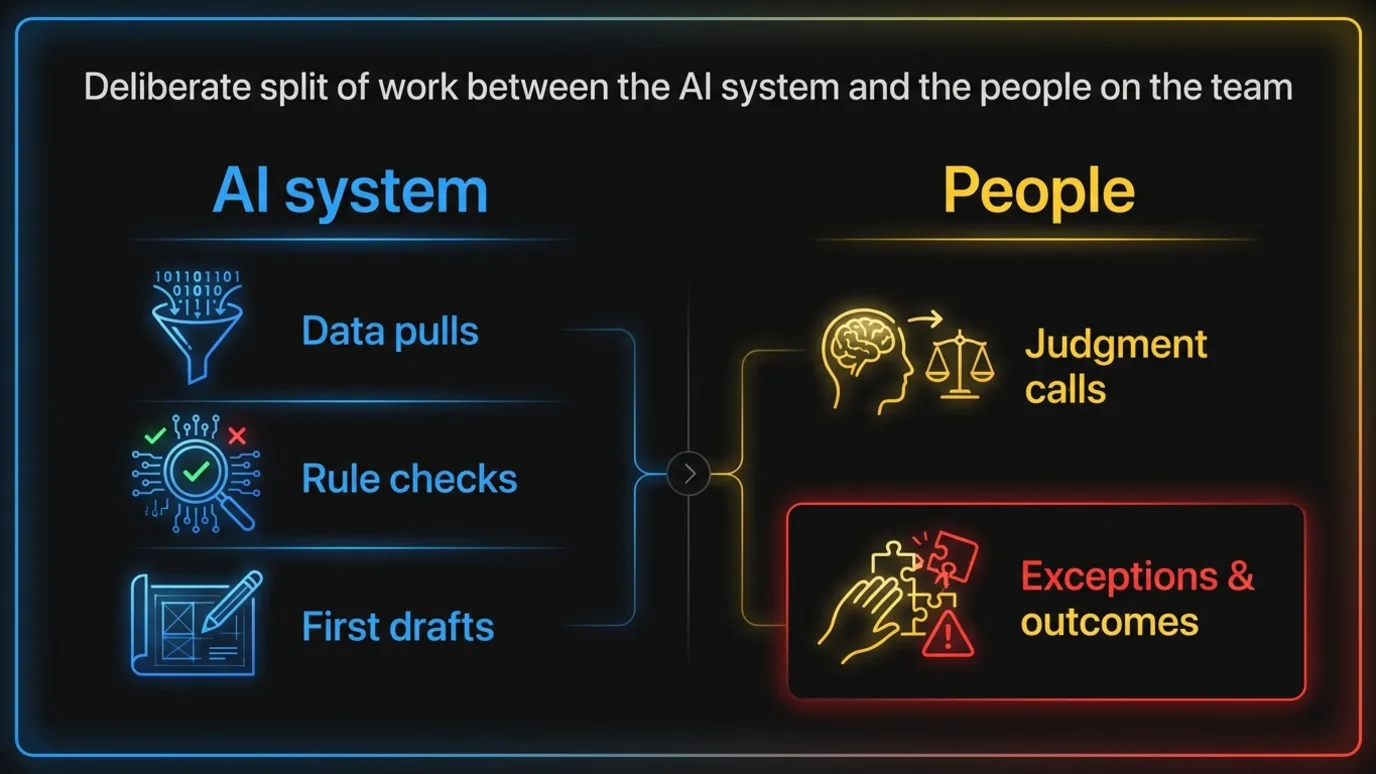
In practice, the split looks like this.
The system does the repetitive work. Pulling data from five systems into one view. Checking an order against pricing rules. Drafting the first version of a quote, a report or a response. Classifying incoming requests. This is the work operators find tedious, and it’s where the hours go.
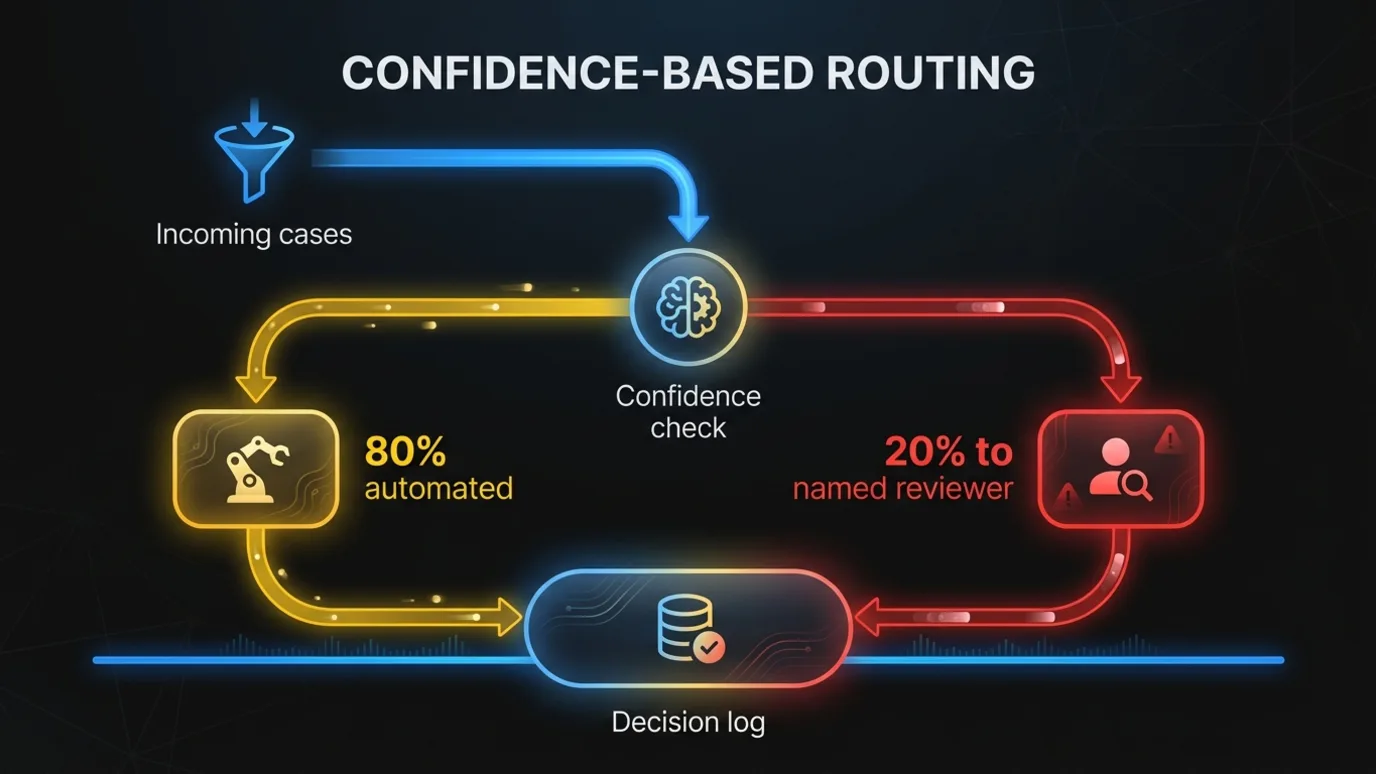
People own the judgment calls. When a case falls outside the rules, when confidence is low, when the customer relationship matters more than the policy, the system routes it to a named person with all the context attached. The person decides. The system records the decision and the reason.
People own the outcome. Every workflow has an accountable owner on your team. Not the vendor, not “the AI.” When something goes wrong, there’s a person who understands how the system works and has the authority to change it.
This sounds like it caps the efficiency gains. In our experience it does the opposite. A system that routes the hard 20% to people can safely automate the easy 80%. A system that tries to automate 100% has to be so conservative, or so heavily checked, that it often ends up automating less.
How do you make every AI decision traceable?
Log enough that you can reconstruct any decision the system touched, quickly. Auditability is the practical foundation for keeping people accountable. For every decision, you should be able to answer five questions:
- What inputs did the system see?
- What did it recommend, and which rules or signals drove that recommendation?
- Did a person review it? Who?
- Did they accept, change or override it, and why?
- What happened next?
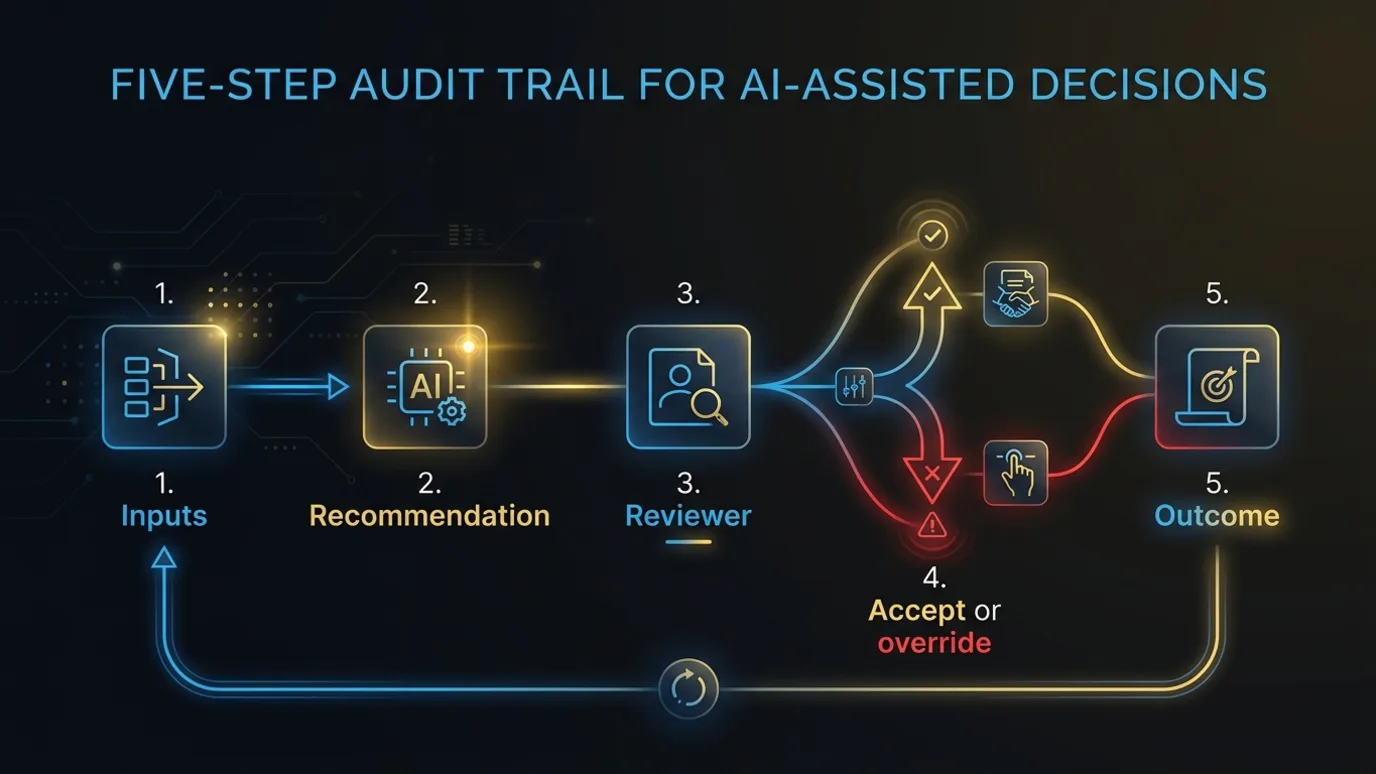
If you can answer those, three things become possible. Operators trust recommendations because they can see the reasoning. Managers review patterns in overrides and improve the system. And when a customer, an auditor or a regulator asks why something happened, you have an answer that doesn’t start with “we think.”
Design choices matter here too. Decision logic that lives in readable, versioned rules is easier to audit than logic buried in a prompt. Models are useful for messy inputs like reading an email, classifying a document or extracting fields from a PDF. The policy decisions that follow should be explicit wherever possible. We cover the broader picture in AI governance for product teams, and the monitoring side in AI agent observability.
What do security and governance require for Canadian companies?
Know where your data goes, give the system only the access it needs, and keep the audit trail in systems you control. A tool your team trusts also has to be one your security and legal teams can live with.
Know where data goes. Which systems does the AI read from? Which external model APIs does data pass through? Where are those hosted? Personal information in Canada falls under PIPEDA (the Personal Information Protection and Electronic Documents Act) federally, and Quebec’s Law 25 adds its own obligations, including transparency requirements when decisions about individuals are made by automated processing. Map the data flow before you build, not after.
Limit access to what the workflow needs. A system that drafts renewal summaries doesn’t need write access to your policy admin system. Scope permissions narrowly and log access.
Keep the audit trail inside your walls. The decision logs described above are business records. They belong in systems you control.
Bilingual matters operationally. If your team or your customers work in French, a system that only handles English inputs well will push French cases into the exception queue. That’s a hidden tax on your Quebec operations. Test with real French-language data from day one.
For more on running AI programs under Canadian rules, see Canadian governance for AI programs.
How do you roll it out so people actually use it?
Involve operators early, start with the work they hate and measure the hours you give back. Design gets you a system that deserves trust. Rollout decides whether it earns it.
Involve operators from day one
The people who do the work should help design the system, not just test it at the end. Sit with them. Watch how they work. Ask what they check before every decision and what they wish they didn’t have to do.
That does two things. You capture the rules and context the system needs, most of which aren’t written down anywhere (we cover the method in getting institutional knowledge into production). And operators see their own expertise reflected in the system. People don’t resist a tool they helped build.
Start with the work they hate
Every team has tasks everyone dreads. Re-keying data from PDFs into the ERP (enterprise resource planning system). Reconciling two spreadsheets that should match and never do. Chasing missing information from customers. Writing the same status update email forty times a week.
Start there. When the first thing an AI system does is take away the worst part of someone’s day, adoption stops being a problem. The team starts asking what else it can do.
Leading with the work people value most backfires. Automate the judgment calls your senior people are proud of and you’ll get resistance from exactly the people whose knowledge you need.
Measure their time back
Track the metric your operators care about: hours returned to them. Skip “headcount equivalent saved,” which tells everyone the goal is cuts. Measure time spent on manual data entry before and after. Time from request to response. The number of cases each person handles that need real thought, versus rote processing.
Then make a visible call on where that time goes. Faster customer response. More proactive account work. Handling growth without hiring ahead of it. Clearing the backlog of improvements nobody had time for. When people see their recovered hours going into more interesting work, they start bringing you the next workflow to fix.
What does this look like a year later?
The team stays the same size, handles more volume and owns the system. Picture a 300-person manufacturer that rolls out an AI system for customer quoting this way. A year later, the estimating team hasn’t shrunk. They handle noticeably more quotes, and turnaround is faster. The two senior estimators spend their time on complex custom jobs and on reviewing how the system handles edge cases, instead of pricing standard parts all day.
The quoting rules live in a system the operations manager can read and change. Every quote has a trail showing what the system proposed and who approved it. When a new estimator joins, they learn from the system’s reasoning alongside a senior colleague, and they ramp faster than new hires used to.
That’s an illustrative picture, but the structure is what matters. The company didn’t get smaller. It got more capacity, more consistency and less dependence on any one person’s memory.
The other version of that story, where the estimating team gets cut in half and the system runs unsupervised, tends to look good for about two quarters. Then the edge cases pile up and nobody’s left to catch them.
Who should build it?
Pick a partner who works alongside your operators, builds inside your environment, stays accountable for production results and hands over the code and operating context at the end. How you build matters as much as what you build. A vendor selling a closed product has every incentive to make it a black box. A consultant who designs the system and leaves can’t answer for how it runs in production. We compare those models in vendor, consultant or operating partner.
Frequently Asked Questions
Does human-in-the-loop AI limit the efficiency gains?
Usually not. Routing the hardest 20% of cases to people lets you safely automate the routine 80%, while a system that tries to automate everything has to be so conservative or so heavily checked that it often automates less.
What should an AI decision log capture?
The inputs the system saw, what it recommended and why, who reviewed it, whether they accepted or overrode it and the reason, and what happened next. If you can answer those five questions for any decision, you can audit it.
Which workflows should a team automate first?
Start with the tasks everyone dreads, like re-keying PDF data, reconciling spreadsheets or chasing missing customer information. Taking away the worst part of someone’s day builds adoption faster than automating the judgment calls senior staff value.
If you’re working out where AI fits in your operation and want to do it without losing the judgment your team carries, talk to Chrono Innovation. We’ll look at one workflow with you and work through what the system should handle and what should stay with your people.