Key Takeaway
The rules that run your operation live in people, spreadsheets and email threads, not in your ERP. Capture them through shadowing, an exception log and replay validation before you build anything, then ship a system that automates routine cases, routes the rest to named people and learns from every override.
Every mid-market company has someone like Diane. She’s worked in customer service, estimating or order management for fourteen years. When a strange order comes in, people forward it to her. She looks at it for thirty seconds and says, “That’s a Western account, they always want it split-shipped, and don’t quote the 40-foot length because that mill has been short since spring.”
None of that is written down. Some of it sits in a spreadsheet tab called “DO NOT DELETE.” Some of it is buried in an email thread from 2019. Most of it lives in Diane.
That’s the real raw material for useful AI in an operating business. It’s also why most AI projects in process-heavy companies stall. Teams start with the model, the vendor or the data warehouse, while the knowledge that makes the process work sits somewhere none of those can reach.
This post is about method: how an embedded team gets that knowledge out of people’s heads and into a system that runs in production, sends the hard cases back to people, and can be audited later. We’ve written separately about how embedded teams are staffed and structured. This one covers what they do once they’re in the room.
Where does operating knowledge actually live?
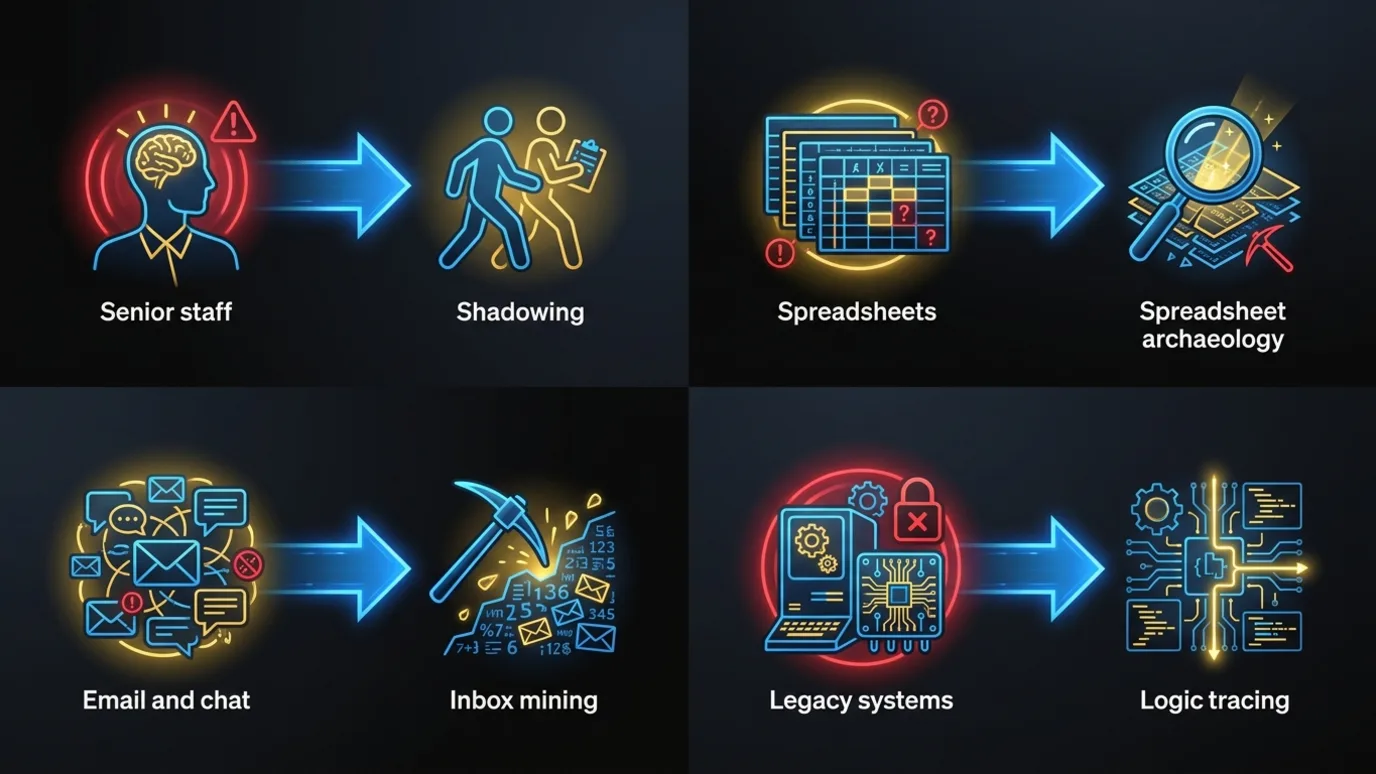
It lives in four places: senior staff, spreadsheets, email and chat threads, and legacy systems. Each one needs a different extraction technique. You need an honest map of all four before you can capture anything.
Senior staff. The most valuable source and the least documented. Experienced operators carry hundreds of small decision rules, and they can’t articulate most of them when asked directly. Ask Diane how she prices a rush order and you’ll get two sentences. Watch her price twenty and you’ll find eleven rules.
Spreadsheets. Usually the closest thing to a written rulebook. A quoting workbook maintained for eight years holds lookup tables, override columns, hard-coded exceptions and formulas that encode business policy. It also holds dead logic nobody uses and nobody dares remove.
Email and chat threads. This is where exceptions get negotiated. “Can we waive the minimum for this customer?” “Yes, but only on stock items.” That approval is a rule. It just never made it into a system.
Legacy systems. The ERP (enterprise resource planning system), the old Access database, the custom order tool someone built in 2011. They hold the structured data plus a layer of logic buried in stored procedures, status codes and field conventions (“if the PO number starts with X, it’s a consignment order”).
Most AI initiatives only look at the fourth source because it’s the easiest to query. The resulting system handles the easy cases and falls apart on everything Diane would have caught.
How do you capture knowledge that was never written down?
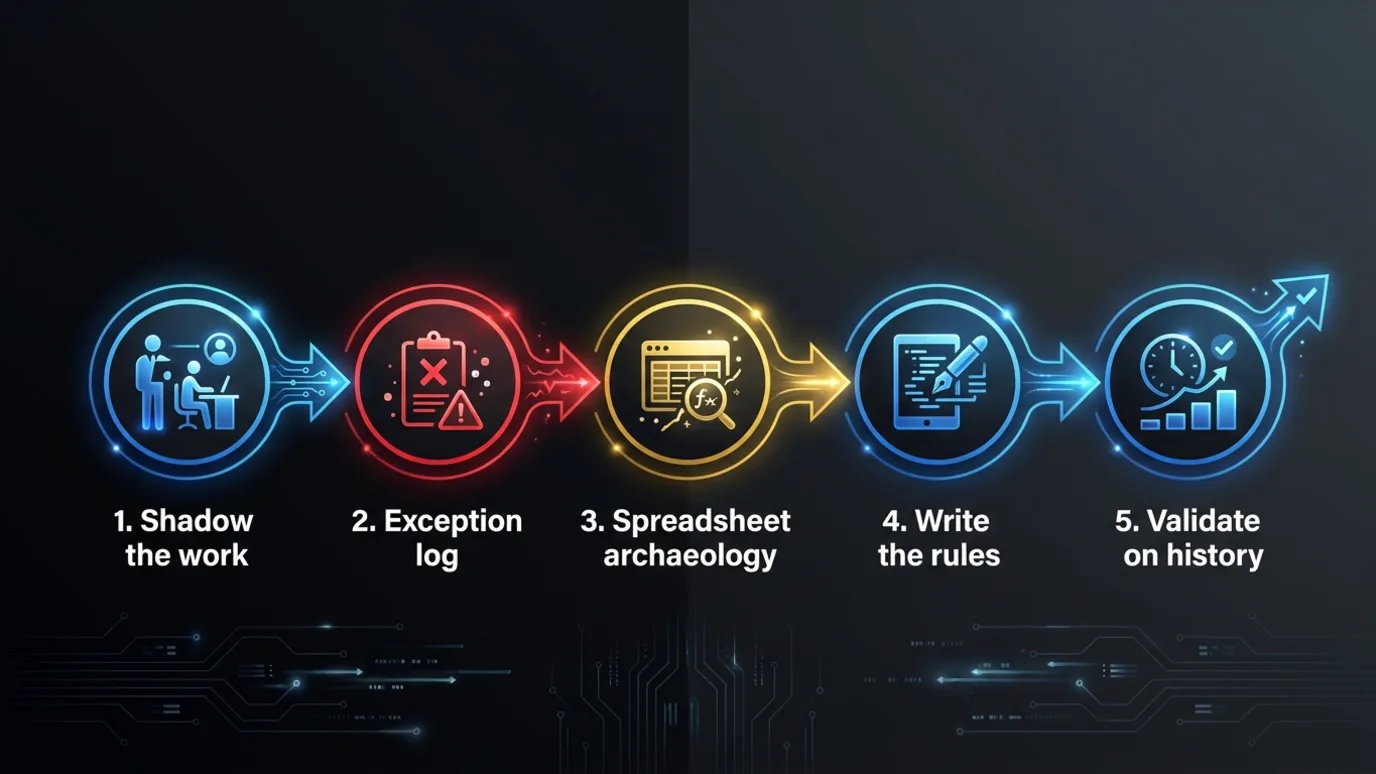
You do fieldwork. A requirements workshop or a survey won’t get you there. Below are the five techniques we use, roughly in the order we use them.
1. Shadow the work, not the process document
Sit with the people who do the work. Not the manager who describes the process, the operator who runs it. Watch real transactions, in real time, with their real tools open.
Two rules make shadowing pay off:
- Ask “why” at the moment of decision. “Why did you change the freight terms on that one?” gets a far better answer in the moment than in a meeting two weeks later.
- Record what they look at before they decide. If an estimator checks a supplier’s lead-time sheet before quoting, that sheet is an input to the decision. It needs to be an input to the system too.
A few days of shadowing two or three operators usually surfaces more rules than months of process documentation.
2. Build an exception log
Normal cases are cheap to understand. The knowledge lives in the exceptions. For two to four weeks, have the team log every transaction that needed a judgment call: what came in, what was unusual, what they decided and why.
Keep it light. A shared form with five fields is enough, and volume matters more than polish. After a few weeks you’ll have a few hundred real exceptions, and they’ll cluster. Most companies find that what felt like endless variety is really fifteen or twenty recurring patterns plus a long tail.
That clustering tells you what the system should handle automatically, what it should flag, and what it should never touch.
3. Do spreadsheet archaeology
Pull every spreadsheet involved in the workflow and read it like code, because it is code. For each one, document:
- Which columns are inputs and which are calculated
- Which formulas encode a business rule (a margin floor, a customer tier discount, a freight surcharge)
- Which cells are manual overrides, and how often they’re used
- Which tabs are dead
The overrides are the interesting part. A column labeled “Adj” that gets filled in on 30% of rows is telling you the formula doesn’t match how the business actually prices. Find out who fills it in and what they’re thinking when they do.
4. Write the decision rules down explicitly
Once you have shadowing notes, the exception log and the spreadsheet logic, write the rules in plain language. Not in code yet. Something like:
If the customer is on the Western price list AND the order includes cut-to-length steel AND the requested ship date is less than 5 business days away, then quote the rush surcharge, check mill inventory before confirming length, and default to split shipment.
Each rule gets an owner (the person who knows it best), a source (shadowing, exception log, spreadsheet, email) and a confidence level. Some rules are hard policy. Others are “Diane usually does this.” That distinction changes how the system treats them.
5. Validate with the people who do the work
This step gets skipped more than any other, and skipping it is how you end up with a system the team ignores.
Take the written rules back to the operators and walk through them line by line. Then replay history: “Here are fifty orders from last quarter. Here’s what the rules say should have happened. Here’s what actually happened.” Every mismatch is a missing rule, a wrong rule, or a case where a person made a different call for a reason worth understanding.
This is also when operators start trusting the project. They see their own judgment reflected accurately, and they get to correct it. That does more for adoption than any training session later.
How do you keep people in the loop once the rules are automated?
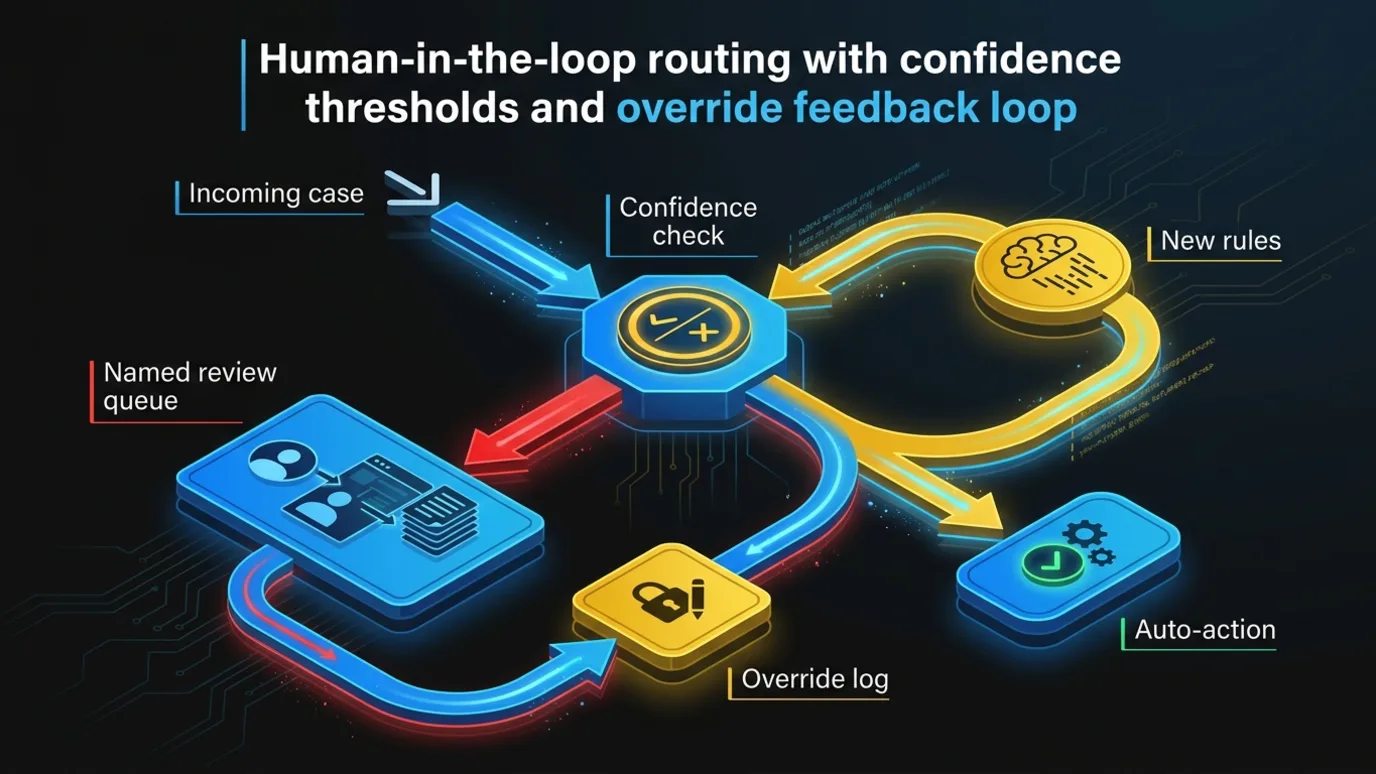
Don’t automate every rule just because you captured it. Build a system that handles routine work reliably and sends cases that need judgment to the right person, with enough context to decide fast. Three design choices make that work.
Confidence thresholds with a clear route. Every decision the system makes carries a confidence signal from rule matches, model scores, or both. Above the threshold, the system acts. Below it, the case goes to a named queue owned by a person. The threshold starts conservative and moves as the team builds trust.
Context with every handoff. When a case lands with a person, the system shows what it saw, which rules fired, what it would have done and why it stopped. The operator shouldn’t have to redo the investigation. They should be able to approve, adjust or override in under a minute.
Every override is training data. When someone changes the system’s recommendation, the override gets logged with a reason code. Once a week, someone reviews the overrides. Recurring patterns become new rules. One-offs stay human. That’s how the system improves without anyone retraining a model from scratch.
A system built this way produces an audit trail by default. For every transaction you can answer what came in, what the system recommended, which rules applied, who approved it, and when. Most spreadsheet-driven processes can’t answer any of those questions today.
What does this look like at a mid-market distributor?
Here’s an illustrative scenario. It’s a composite, not a specific client, but every piece of it is typical: eight weeks from shadowing to a governed system that clears routine order exceptions and routes the rest.
The starting point
A 220-person industrial distributor processes about 400 orders a day. Roughly a quarter of them need some manual intervention before release: a credit hold, a substitution, a split shipment, a pricing override, a freight exception.
A team of six in order management handles that work. Two of them have been there over a decade and take the hardest cases. The rules live in:
- A 14-tab Excel workbook used for pricing overrides and freight calculations
- The ERP’s order hold codes, about half of which are no longer used as documented
- A shared inbox where sales reps request exceptions
- The two senior coordinators
Orders needing intervention sit for most of a business day on average. One of the senior coordinators plans to retire within eighteen months. That’s what makes the project urgent.
Weeks 1 to 2: shadowing and the exception log
An embedded pod of three (a delivery lead, an engineer and an operations analyst) spends the first week sitting with the order management team. They watch roughly 300 exception orders get worked. Meanwhile, the team starts logging every exception in a simple form: order number, exception type, decision, reason.
By the end of week two, the log has a few hundred entries. They cluster into 17 recurring exception types. Five of them account for most of the volume: credit holds on accounts slightly over limit, substitutions for discontinued SKUs, split shipments when one warehouse is short, freight overrides for specific regions, and minimum-order waivers.
Weeks 2 to 3: spreadsheet archaeology and rule extraction
The pod works through the 14-tab workbook. Six tabs are dead. Three hold the real pricing and freight logic. One tab, labeled “Exceptions,” is a hand-maintained list of customers who get special treatment, with notes like “per Mark, 2021.”
The pod also mines the shared inbox for approval patterns. Minimum-order waivers turn out to be almost always approved for accounts above a certain annual volume, and almost never for new accounts. Nobody had written that down. It was just how the two senior coordinators handled it.
The output is a rulebook of about 60 decision rules, each with a source, an owner and a confidence level.
Weeks 3 to 4: validation
The pod replays three months of historical exceptions against the rulebook. On the first pass, the rules match the human decision on a little under three quarters of cases. Two working sessions with the coordinators sort out the mismatches. Most trace back to a handful of missing rules, like a seasonal freight rule and a set of customers with contract pricing that existed only in someone’s memory. After updates, the replay match rate climbs high enough that the team is comfortable automating the top patterns.
Weeks 5 to 8: building the governed system
The production system does four things:
- Classifies each held order into one of the known exception types, using ERP data plus the order notes.
- Applies rules for the high-confidence types and prepares a recommended action with the reasoning attached.
- Auto-releases a defined subset (for example, split shipments where both warehouses have stock and the customer accepts partials) and logs each release.
- Routes everything else to the right coordinator’s queue, with the recommendation, the rules that fired and the customer history on one screen.
Overrides are captured with a reason code. Every action is logged with who or what made the decision. The rules live in a versioned configuration the operations manager can review, not in a model nobody can inspect.
The two senior coordinators become the system’s first reviewers. Their job shifts from working every exception to supervising the system and handling the cases it can’t.
What changes?
You measure three things: time-to-release on held orders, the share of exceptions handled without manual work, and override rate by exception type. The outcome that’s harder to measure matters just as much. When the senior coordinator retires, the rules she carried sit in a system the team understands, owns and can edit. The knowledge stays with the company.
What goes wrong most often?
Five failure modes show up again and again. Most of them come from shortcuts in capture or from neglecting the system once it’s live.
Capturing the official process instead of the real one. If your capture work is mostly manager interviews, you’ll encode how the process is supposed to work. Shadowing and the exception log exist to correct for that.
Automating rules nobody can see. If the decision logic ends up buried in a prompt or a fine-tuned model with no readable rulebook, you’ve built a new Diane, one the team can’t ask questions of. Keep the rules explicit and versioned wherever you can. Use models for classification and extraction, where messy inputs call for judgment.
Treating validation as a sign-off meeting. Validation means replaying real historical cases against the rules with the operators in the room. A slide review doesn’t count.
Skipping the override review. The weekly override review is how the system keeps up with the business. Skip it for a quarter and the system drifts from reality, the team stops trusting it, and the override rate climbs until someone turns it off.
Starting too broad. Capture one workflow properly before you try to map the whole operation. For help picking that first workflow, see proving AI value on one problem. Getting from pilot to a running system has its own traps, covered in why AI pilots stall.
Who should own knowledge capture?
The people who capture the knowledge should also build the system. If one firm interviews your team and another writes the code, every rule gets translated twice and some of it gets lost both times. An embedded pod that shadows your operators in week one and ships the production system in week eight keeps the context intact.
Ownership at the end matters just as much. The rulebook, the code, the override history and the operating context should belong to you. Your next workflow should start from what the first one left behind, not from a blank page. We go deeper on that in what an AI engagement should leave behind, and on keeping your people at the center of the system in AI that makes your team better, not smaller.
Frequently Asked Questions
How long does it take to capture institutional knowledge for one workflow?
For a single workflow, plan on about four weeks of capture and validation: one to two weeks of shadowing and exception logging, a week of spreadsheet and inbox review, and a week of replaying historical cases. Building the governed production system typically takes another four weeks.
Should the captured rules live in an AI model or in explicit rules?
Keep business rules explicit, versioned and readable by the operations team. Use models where inputs are messy, such as classifying an order or pulling details from free-text notes. A rulebook buried in a prompt or a fine-tuned model can’t be reviewed or corrected by the people who own the process.
What happens when the system gets a case wrong?
It shouldn’t act alone on cases it’s unsure about. Low-confidence cases go to a named person’s queue with full context, and every override is logged with a reason code. A weekly review turns recurring overrides into new rules.
If you have a workflow that depends on two or three people who carry the rules in their heads, we’d like to hear about it. Book a call with Chrono Innovation and we’ll walk through how we’d capture it, what we’d automate first, and what should stay with your team.