Key Takeaway
Production AI agents fail for three common reasons: no guardrails on LLM outputs, no cost controls on token usage, and no human-in-the-loop for high-stakes decisions. The fix is a layered architecture with output validation, budget limits, fallback paths, and escalation points built in from day one.
Agent demos are impressive. You show the agent a task, it breaks it down, calls the right tools, handles the responses, and delivers a result. Stakeholders applaud. Investors nod approvingly. Your team feels great.
Then you ship it.
Production agents are humbling. Real users don’t follow scripts. They send vague requests, change their minds mid-task, and find edge cases you never imagined. The agent that looked brilliant in demos starts sending wrong emails, deleting wrong files, and confidently doing exactly what nobody asked for.
The gap between demo and production isn’t about the underlying technology. It’s about the difference between controlled conditions and chaos. This article covers what makes agents actually work when real users touch them.
Why Demo Agents Fail in Production
Users don’t follow the script
In demos, you craft perfect requests. “Book a meeting with John for next Tuesday at 2pm to discuss the Q3 roadmap.” Clear. Complete. Unambiguous.
In production, you get “do the thing” and “can you handle that email from earlier” and “set up something with the team sometime next week I guess.”
Real users assume context you don’t have. They reference conversations from three days ago. They use pronouns without antecedents. They contradict themselves within a single message.
Agents that work in production handle ambiguity gracefully. They ask clarifying questions when needed. They make reasonable assumptions and state them explicitly. They don’t guess on important decisions.
Tool calls have real consequences
Demo environments are sandboxed. Mock APIs return predictable responses. Nothing actually happens when the agent “sends” an email or “creates” a calendar event.
Production is different. That email goes to a real person. That calendar invite blocks real time. That database write changes real data. That API call costs real money.
One wrong tool call can be catastrophic. An agent that confidently sends an angry email to your biggest client isn’t a bug you can quietly fix. An agent that deletes production data isn’t something you can undo with a git revert.
“Oops” isn’t an acceptable error message when the consequences are real.
Multi-step workflows compound errors
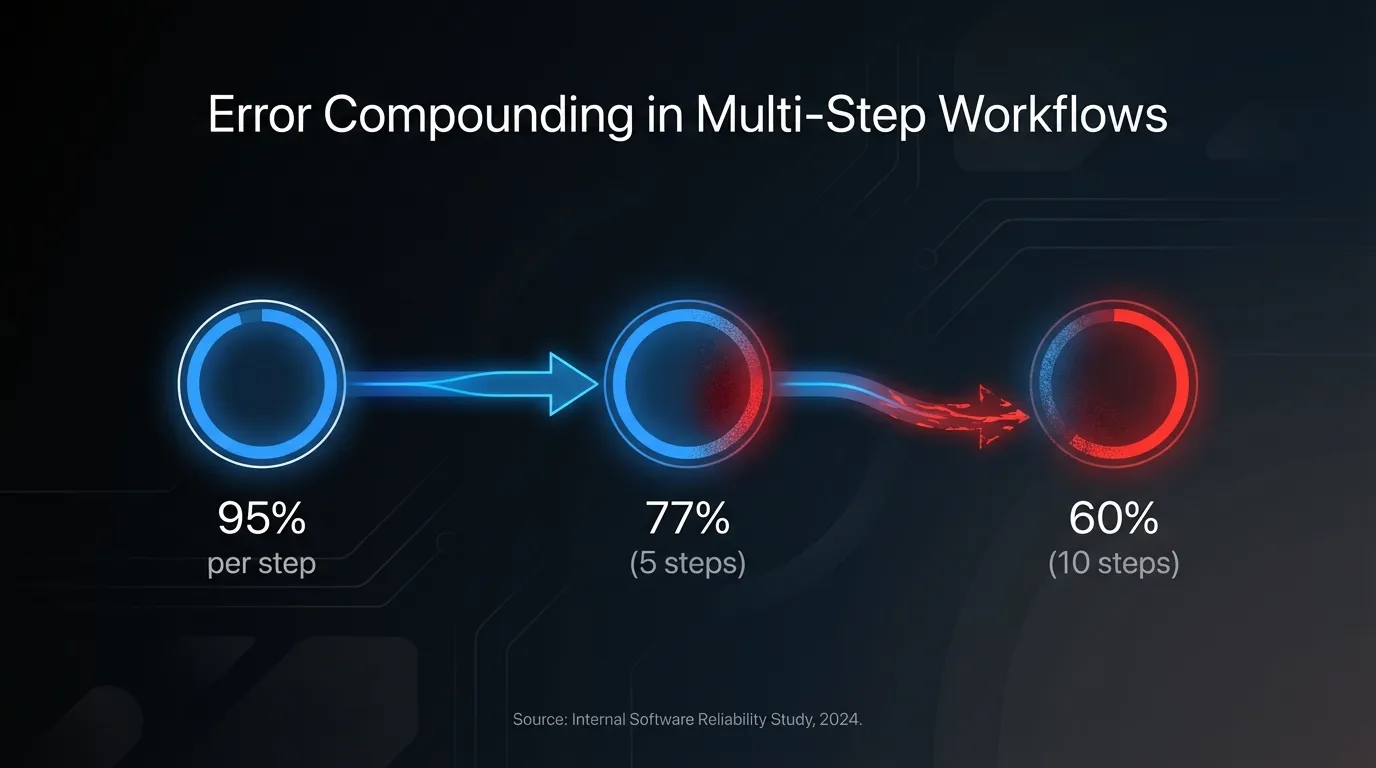
Here’s math that should scare you: if each step in a workflow has a 95% success rate, a 5-step workflow succeeds only 77% of the time. A 10-step workflow? 60%.
And that assumes errors are independent. In reality, early errors cascade. The agent misunderstands step 2, and now steps 3 through 10 are working from a flawed premise. The final output isn’t just 5% wrong—it’s completely wrong in a way that looked right at each individual step.
Complex autonomous workflows need error correction at every stage, not just at the end.
Context limits hit faster than you think
Long conversations fill context windows. The agent that perfectly remembered your preferences at minute one has forgotten them by minute thirty. Users expect continuity you can’t provide.
Summarization seems like the answer, but summaries lose details. The detail that seemed unimportant when you summarized turns out to be critical three turns later. Now the agent is confidently wrong because it literally doesn’t remember the information that would correct it.
The Production Agent Architecture
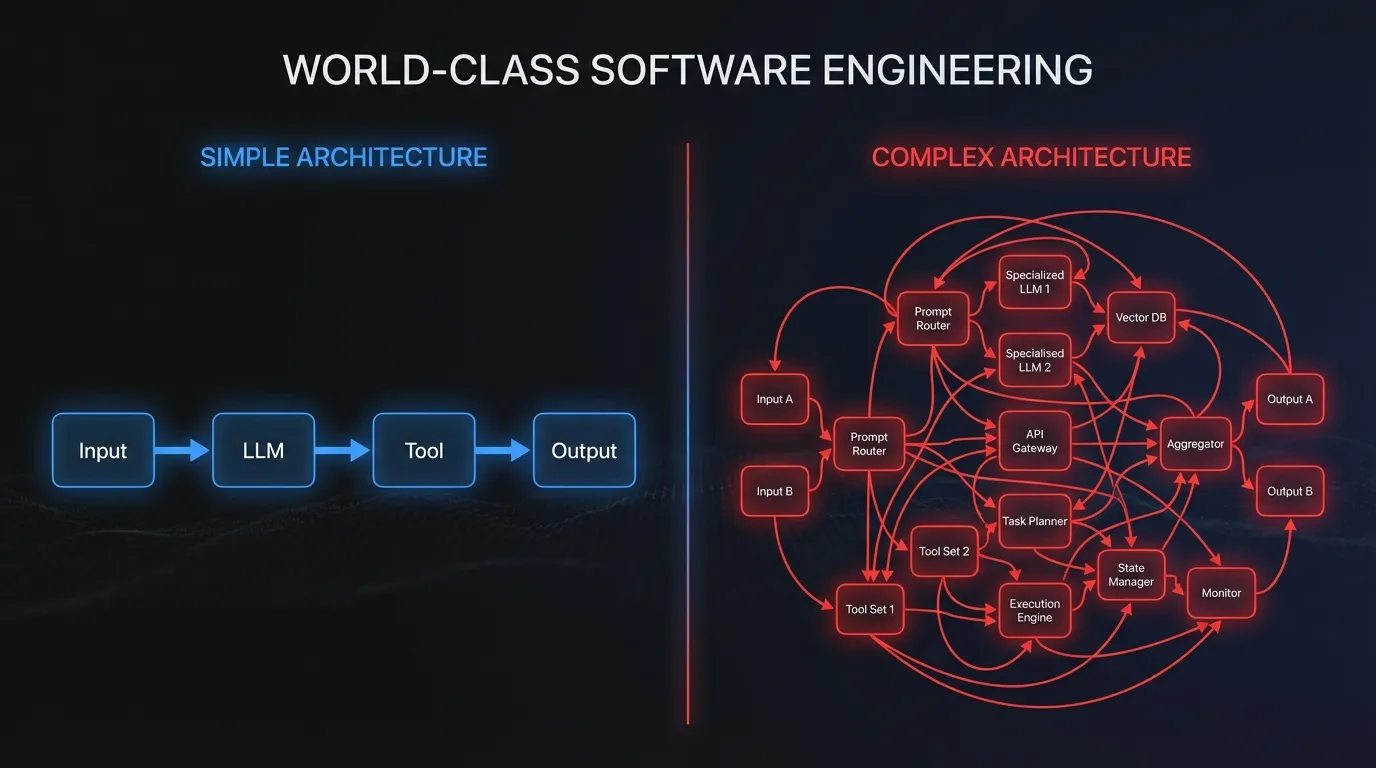
Anthropic’s research on building effective agents emphasizes a counterintuitive finding: simple agents beat complex ones.
Simple agents beat complex ones
The most reliable production agents aren’t sophisticated autonomous systems with complex reasoning chains. They’re simple, composable patterns that do specific things well.
Complex frameworks with multi-agent orchestration and elaborate planning systems look impressive. They also have more failure modes, are harder to debug, and often underperform simpler approaches on real tasks.
Start with the simplest agent that could work. Add complexity only when you have evidence it’s needed. Most of the time, you won’t need it.
Hard-code what you can
Not every decision needs LLM judgment. If a user asks to “delete everything,” that should trigger a hard-coded confirmation flow, not an LLM weighing whether to proceed.
Use deterministic routing for known patterns. Rule-based validation before actions. Explicit guardrails that don’t depend on the model’s judgment.
Save LLM reasoning for genuinely uncertain decisions where flexibility matters. For everything else, code is more reliable than inference.
Human-in-the-loop by default
OpenAI’s practices for governing agentic systems emphasizes keeping humans involved, especially for high-stakes decisions.
High-stakes actions should always require approval. Low-confidence outputs should escalate to humans. Users should be able to request human handoff anytime.
This isn’t a limitation. It’s a feature. Humans catch errors the agent misses. Feedback from humans improves the agent over time. And users trust systems more when they know a human is available.
Five Controls Every Production Agent Needs
Control 1: Action classification
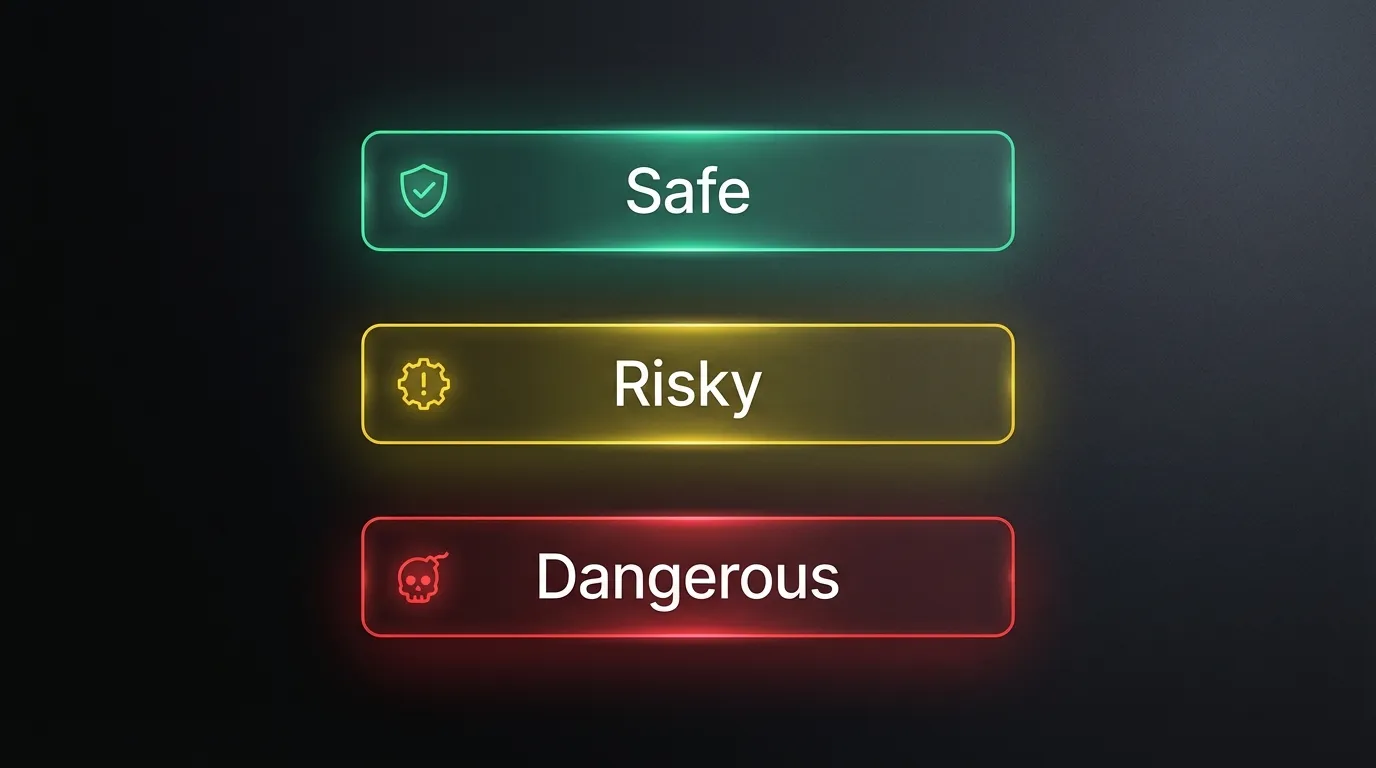
Not all actions are equal. Classify them by risk:
Safe actions are read-only and reversible. Looking up information. Drafting a response for review. Generating a report. If these fail, nothing bad happens.
Risky actions create data or send messages. Creating calendar events. Sending emails. Posting to Slack. Mistakes are visible and embarrassing but usually fixable.
Dangerous actions have significant consequences. Deleting data. Financial transactions. Actions affecting customers. Mistakes here can be catastrophic.
Each category needs different approval requirements. Safe actions can proceed automatically. Risky actions might need a confirmation. Dangerous actions require explicit human approval every time.
Control 2: Confidence thresholds
Your agent should know when it’s uncertain. Build in confidence estimation, and define thresholds for different behaviors.
High confidence: proceed normally. Medium confidence: state assumptions explicitly, ask for confirmation. Low confidence: ask for clarification before proceeding. Very low confidence: escalate to a human.
“I’m not sure what you mean—could you clarify?” is a much better response than confidently doing the wrong thing.
Control 3: Rate limiting per action type
How many emails can your agent send per hour? How many database writes per minute? How many API calls per second?
Without limits, confused agents enter runaway loops. They retry the same failed action forever. They send the same notification a hundred times. They burn through your API budget in minutes.
Set different limits for different risk levels. Read operations can be more liberal. Write operations need tighter constraints. Dangerous operations need the strictest limits.
Control 4: Comprehensive logging
Every tool call should be logged with full context. What was the input? What did the agent decide? What was the output? What was the reasoning? When did it happen?
Without logs, debugging production issues is guesswork. With logs, you can trace exactly what happened, understand why, and fix it.
Logs also enable compliance and audit. When someone asks “why did the agent do that?”, you need to be able to answer.
Control 5: Kill switches
You need the ability to pause your agent immediately. Not “after the current task completes.” Immediately.
Build in rollback capabilities where possible. If the agent just sent ten emails, can you unsend them? If it created records, can you delete them?
When you hit the kill switch, notify affected users that the agent is paused. Have a clear process for reviewing what happened and resuming when ready.
Handling Agent Failures Gracefully
When tool calls fail
External APIs fail. Databases time out. Services go down. Your agent needs to handle this.
Retry with backoff, but not forever. Three attempts with exponential backoff is reasonable. Infinite retries is a recipe for runaway costs and stuck tasks.
When retries fail, fall back to alternatives if they exist. If no alternative works, tell the user what’s happening. “I wasn’t able to send that email because the mail server is down. Want me to try again in a few minutes, or would you like to send it manually?”
Never leave tasks half-complete without telling the user.
When the agent gets confused
Detect confusion. Repeated actions with the same input usually mean something’s wrong. Contradictory outputs in sequence suggest the agent is stuck. Responses that don’t address the user’s question indicate misunderstanding.
When you detect confusion, reset context with a summary of what’s been accomplished and what’s pending. Ask the user for clarification. If that doesn’t work, escalate to a human.
When users are adversarial
Some users will try to break your agent. Prompt injection attempts. Requests for harmful actions. Clever tricks to bypass guardrails.
Build guardrails at both input and output. Validate what comes in. Validate what goes out. Don’t assume the model’s judgment is sufficient for security-critical decisions.
When unexpected edge cases appear
You can’t anticipate everything. When something unexpected happens, log everything. Degrade gracefully to a manual process. “I encountered something unexpected and couldn’t complete this automatically. Here’s what I was trying to do—can you help me finish?”
After the incident, review what happened. Fix the underlying issue. Add the edge case to your test suite so it doesn’t happen again.
The Testing Pyramid for Agents
Unit tests
Test that individual tool functions work correctly. Inputs are validated. Outputs are formatted consistently. Error cases return appropriate responses.
This is normal software testing. Don’t skip it because you’re working with AI.
Integration tests
Test that tool chains execute end-to-end. The output of tool A feeds correctly into tool B. Error handling triggers when it should. Logging captures the data you expect.
Adversarial tests
Try to break your agent. Send prompt injection attempts. Give confusing inputs. Request things the agent shouldn’t do.
If you don’t test adversarial cases, your users will find them for you. Better to find them first.
Chaos tests
What happens when external APIs fail? What happens when context is full? What happens with a hundred concurrent users? What happens when the agent is given contradictory instructions?
Chaos tests reveal failure modes you won’t find any other way.
Patterns That Work
The assistant with guardrails
The agent can do many things, but dangerous actions queue for human approval. Most requests are handled automatically. High-risk requests get human review.
This pattern maximizes automation while maintaining safety. Users get fast responses for routine tasks. Risky tasks get human oversight.
The specialized worker
The agent does one thing extremely well. Narrow scope. Deep expertise. Clear boundaries that prevent overreach.
Specialized agents are easier to test, easier to validate, and more reliable than generalist agents trying to do everything.
The human amplifier
The agent prepares, the human decides. Research and summarization are automated. Analysis and recommendations are generated. But final actions require human confirmation.
This captures most of the productivity benefit while keeping humans in control of decisions that matter.
Metrics for Production Agents
Track what matters:
Task completion rate. How often does the agent successfully complete what users ask?
Escalation rate. How often does it need human help? Too high means it’s not useful. Too low might mean it’s not escalating when it should.
Error rate by action type. Are certain actions failing more than others? That’s where to focus improvement.
User satisfaction. Simple thumbs up/down on agent responses. Trends matter more than absolutes.
Cost per successful task. Are you spending efficiently? Is cost scaling appropriately with usage?
Time to completion. Is the agent actually faster than manual alternatives?
Building for Production From Day One
Agents are powerful. They’re also dangerous if built carelessly. The agents that work in production aren’t the most sophisticated—they’re the most controlled.
Simple architectures with clear boundaries. Hard-coded guardrails for predictable situations. Human oversight for high-stakes decisions. Comprehensive logging for debugging. Kill switches for emergencies.
Build these in from the start. Retrofitting safety into a system that wasn’t designed for it is much harder than building it right the first time.
The goal isn’t to build an autonomous system that never needs human input. It’s to build a system that handles routine tasks reliably and knows when to ask for help. That’s what production agents actually look like.
Building agents and want to make sure they’re production-ready? We help teams implement the controls and architecture patterns that make agents reliable. Get in touch.