Every AI agent architecture diagram you find online shows the same thing. An LLM in the center. Arrows to tools. A memory store off to the side. A clean loop: the user sends a message, the agent reasons, calls a tool, gets a result, responds. Done.
That diagram covers about 10% of what a production agent actually does.
The other 90% is work nobody draws on a whiteboard. Handling partial failures mid-execution. Managing state across sessions that run for hours. Tracing why an agent picked Tool A over Tool B in a chain of fifteen decisions. Recovering when the third-party API returns a 500 on step 11 of 14. This is the real architecture. The boring, critical, keeps-your-system-alive-at-3am architecture.
The gap between a demo agent and a production agent isn’t about smarter prompts or better models. It comes down to three things: failure handling, observability, and state management. Teams that get this ship reliable agents. Teams that don’t build demos that break under load.
The Core Loop Is Simple. Everything Around It Is Not.
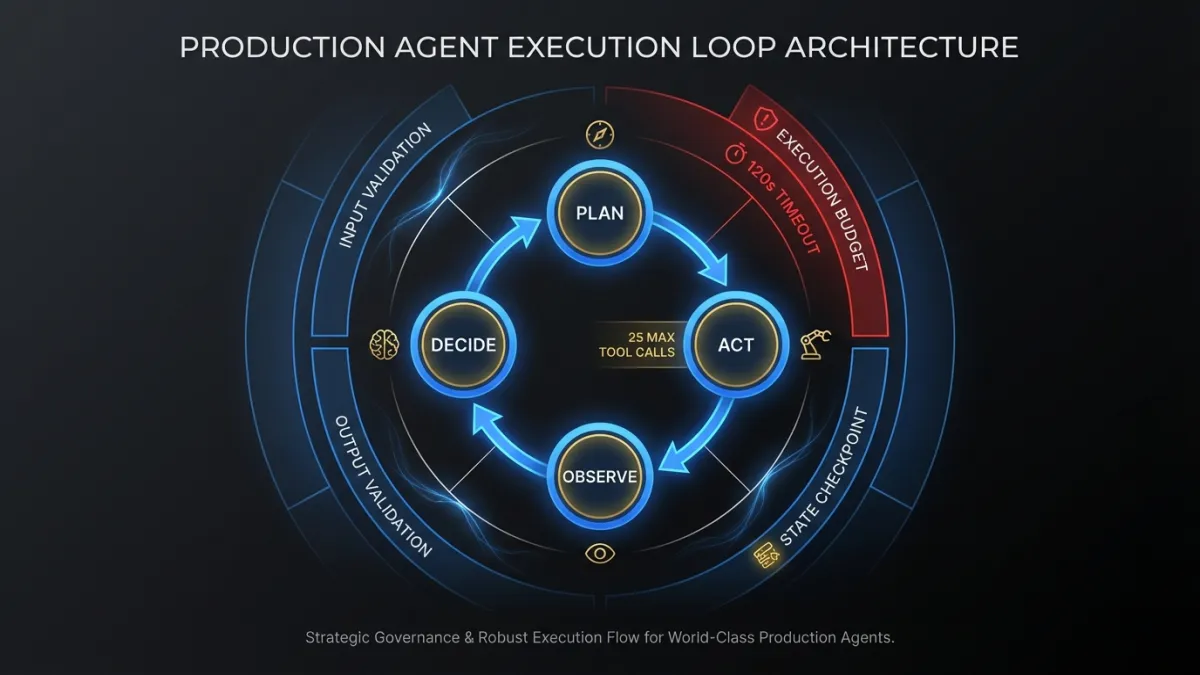
The basic agent execution loop is well understood. Plan, act, observe, decide. The LLM receives context, picks an action (usually a tool call), observes the result, and decides whether to continue or respond. ReAct, function calling, tool use. Different names for the same pattern. If you want the fundamentals, our builder’s guide to agentic AI covers the core concepts.
Production systems wrap this loop in layers of infrastructure that handle everything the loop itself ignores.
Input validation happens before the LLM ever sees the request. Is the user authenticated? Does their session have the right permissions for this agent’s tools? Are the input tokens within budget for this request tier?
Output validation happens after every tool call and every LLM response. Did the model return valid JSON where JSON was expected? Does the structured output match the schema? Are there hallucinated field values that would corrupt downstream data?
Execution budgets cap how many steps the agent can take, how many tokens it can consume, and how long it can run. Without them, a confused agent loops forever, burning tokens and compute while accomplishing nothing. We set hard limits: maximum 25 tool calls per execution, 120-second wall clock timeout, 50K token output budget. The exact numbers depend on the use case, but the principle is non-negotiable. Every agent gets a budget.
State Management Patterns
State management is where most agent architectures quietly fall apart. A demo agent keeps everything in the LLM’s context window and calls it done. A production agent needs to handle:
- Long-running tasks that outlive a single request/response cycle
- Resumption after failure without re-executing completed steps
- Concurrent access when multiple agents or users touch shared resources
- Audit trails that reconstruct exactly what happened and why
The simplest pattern that works in production is an explicit state machine. Each agent execution has a state object stored in a durable store (Postgres, Redis, DynamoDB). The state object tracks:
class AgentExecutionState:
    execution_id: str
    status: Literal["running", "waiting_human", "paused", "completed", "failed"]
    current_step: int
    steps_completed: list[CompletedStep]
    context_snapshot: dict          # serialized context at last checkpoint
    tool_results: dict[str, Any]    # cached results keyed by step_id
    retry_count: int
    created_at: datetime
    last_checkpoint: datetime
Every tool call writes its result to tool_results before moving on. If the execution crashes at step 8, recovery loads the state, skips steps 1 through 7 (results already cached), and resumes from step 8. No re-execution. No duplicated side effects.
This is basic, but most teams skip it early on because the context window feels like enough. It is enough, until an execution fails midway through a 14-step workflow that already sent three emails and updated two database records. Without checkpointed state, your options are re-run everything (duplicating those emails) or manually piece together what happened. Neither is acceptable.
For enterprise agent systems, state management also means multi-tenant isolation. Agent A working on Company X’s data must never leak state into Agent B’s execution for Company Y. Sounds obvious. In practice, shared context stores and connection pools make it surprisingly easy to get wrong.
Tool Design: The Overlooked Architecture Decision
Most agent framework tutorials focus on how to call tools. The harder question is how to design them. A well-designed tool interface makes agents more reliable. A poorly designed one makes them hallucinate parameters and misinterpret results.
Good tool interfaces share a few properties:
Atomic operations. Each tool does one thing. get_customer_by_id is a good tool. get_customer_and_update_subscription_and_send_email is three tools pretending to be one. When a compound tool fails, you can’t tell which operation succeeded. When you need to retry, you can’t skip the parts that already completed.
Typed, constrained inputs. Instead of accepting free-form strings, tools define enums and bounded ranges. A priority field that accepts "low" | "medium" | "high" beats one that accepts any string. The LLM is less likely to hallucinate valid values when the valid set is small and explicit.
Informative error responses. When a tool fails, the error message should tell the agent what went wrong and what to do about it. "Customer not found" is useless. "No customer with ID 12345. Did you mean to search by email? Use get_customer_by_email instead." gives the agent a recovery path.
# Weak tool definition — vague, untyped, no error guidance
def search_records(query: str) -> str:
    """Search for records matching the query."""
    ...

# Strong tool definition — specific, typed, actionable errors
def get_customer_by_id(
    customer_id: str,  # UUID format, e.g. "550e8400-e29b..."
) -> CustomerRecord | ToolError:
    """
    Retrieve a single customer record by their unique ID.
    Returns CustomerRecord on success.
    Returns ToolError with suggested_action if customer not found
    or if the ID format is invalid.
    """
    ...
The tool description is part of the prompt. Every word in that docstring costs tokens and influences the agent’s behavior. Write tool descriptions the way you’d write API docs for a junior developer: precise, with examples, covering the failure cases.
Memory Systems: What to Remember, What to Forget
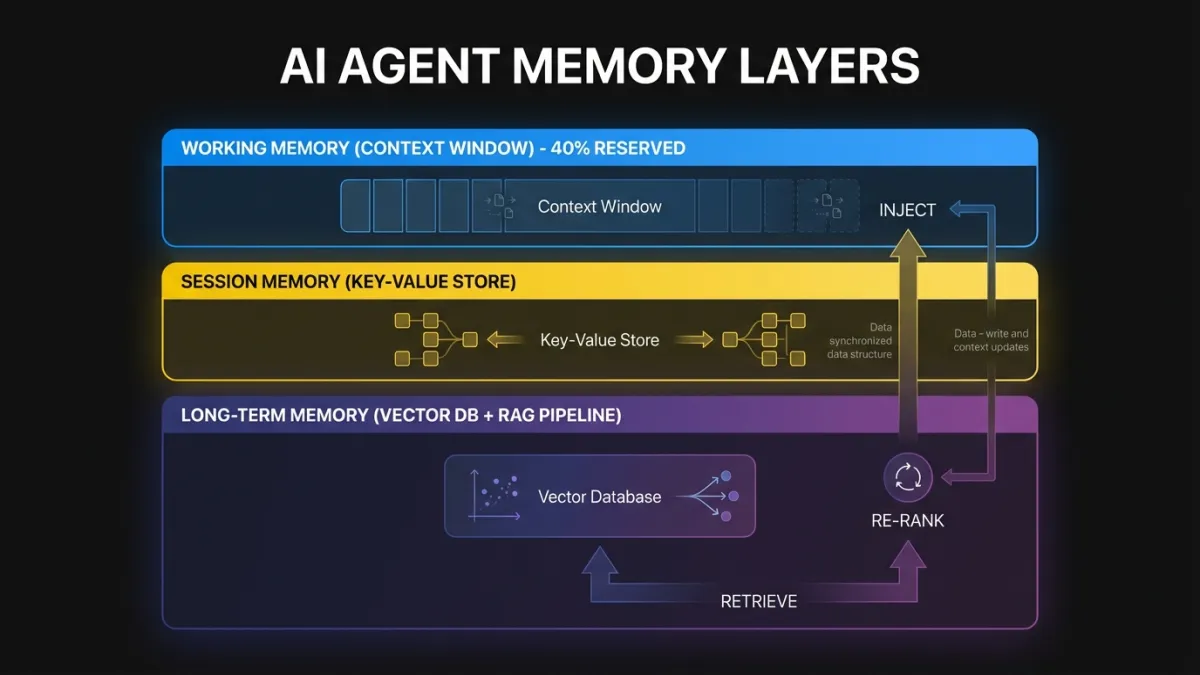
Memory in production agents operates at three layers, each with different storage, retrieval, and eviction strategies.
Working memory is the current execution context. The conversation so far, the tools called, the results received. This lives in the LLM’s context window and the execution state object. The challenge is fitting everything the agent needs into the context window without blowing token limits.
Context window management is an active packing problem. A naive approach stuffs everything in until the window fills, then truncates from the front. A better approach scores each context item by relevance to the current task and evicts low-relevance items first. Tool results from early steps that aren’t referenced later can be summarized or dropped. System prompts can be condensed for continuation turns. We typically reserve 40% of the context window for the agent’s reasoning and output, leaving 60% for input context. That ratio shifts depending on whether the task is retrieval-heavy or generation-heavy.
Session memory persists across turns within a single user session. The user said they prefer CSV exports in turn 2. By turn 15, the agent should remember that without asking again. Session memory is usually stored in a fast key-value store and injected into the context window at the start of each turn.
Long-term memory spans sessions. This is where retrieval-augmented generation (RAG) patterns come in. The agent queries a vector store or search index to pull in relevant historical context: previous conversations with this customer, documentation about this product, patterns learned from similar requests.
The retrieval pipeline matters more than the embedding model. A production retrieval system needs relevance scoring, recency weighting, deduplication, and result capping. Dumping 20 retrieved chunks into the context because they all scored above 0.7 is a fast way to blow your token budget and confuse the agent. Retrieve more than you need, re-rank aggressively, inject only what the agent will actually use.
When to forget is as important as what to remember. If every interaction gets stored permanently, memory becomes noise. Stale information degrades retrieval quality over time. Production systems need expiration policies. Operational memory (what the user asked for today) expires in hours. Preference memory (the user likes CSV) expires in weeks or months. Factual memory (this customer’s account ID) either stays current through sync or gets re-verified on access.
Failure Modes and Recovery
Agent failures differ from traditional software failures. A web server returns a 500, and you retry the request. An agent fails at step 9 of a 14-step workflow, and you need to figure out which steps had side effects, which are safe to retry, and which need human review.
Retry is the simplest pattern. Tool call timed out? Call it again. LLM returned malformed JSON? Re-prompt with a correction hint. Retries work for transient failures. They don’t work for logical errors (the agent chose the wrong tool) or resource constraints (the API rate limit will still be exhausted on retry).
Fallback means switching to an alternative path. The primary LLM is returning 503s? Route to the secondary model. The real-time inventory API is down? Fall back to the cached snapshot from 15 minutes ago. Fallbacks require defining alternative paths at design time, not hoping you can improvise at runtime.
Escalation hands the problem to a human. The agent couldn’t resolve the customer’s issue after three attempts. Instead of a fourth try, it packages the full execution context (what it tried, what failed, what it knows about the customer) and routes it to a human operator. Good escalation includes enough context that the human doesn’t start from scratch.
Circuit breaking prevents cascade failures. If the payment API has failed 5 times in the last minute, stop calling it. Mark the circuit as open. Return a graceful error to the user. Check again in 30 seconds. Without circuit breakers, a failing dependency takes down every agent execution that touches it.
class ToolCircuitBreaker:
    def __init__(self, failure_threshold=5, reset_timeout_seconds=30):
        self.failures = 0
        self.threshold = failure_threshold
        self.reset_timeout = reset_timeout_seconds
        self.last_failure: datetime | None = None
        self.state: Literal["closed", "open", "half_open"] = "closed"

    def call(self, tool_fn, *args, **kwargs):
        if self.state == "open":
            if self._should_attempt_reset():
                self.state = "half_open"
            else:
                raise CircuitOpenError(f"Circuit open. Retry after {self.reset_timeout}s.")

        try:
            result = tool_fn(*args, **kwargs)
            self._on_success()
            return result
        except Exception as e:
            self._on_failure()
            raise
Production systems combine all four patterns. A tool call retries twice, then falls back to a cached result, then escalates if the cached data is too stale. Circuit breakers protect the underlying service throughout.
Observability: Why Standard APM Falls Short
You can monitor a REST API with request counts, latency percentiles, and error rates. That approach breaks down for agents because agents make decisions. Two identical inputs can produce completely different execution paths depending on the LLM’s reasoning. Tracking latency and error rates tells you something failed. It doesn’t tell you why the agent called the billing API when it should have called the refund API.
Agent observability requires decision tracing. Every step in the execution needs a trace entry that captures:
- The context the agent saw at decision time (not just the tool call, but the truncated context window that informed the decision)
- The available actions and why this one was selected
- The tool call parameters, response, and latency
- Token consumption at each step
- The agent’s internal reasoning (chain-of-thought output, if captured)
Standard APM tools (Datadog, New Relic, Jaeger) handle the infrastructure layer: latency, throughput, error rates. They don’t understand agent-level semantics. A trace showing “LLM call: 2.3s, tool call: 0.4s, LLM call: 1.8s” tells you timing. It doesn’t tell you the agent misinterpreted the tool result in the second LLM call and went down a wrong path for six more steps.
Tools like LangSmith, Arize Phoenix, and Braintrust are building agent-native observability. They capture the full decision graph, not just the timing waterfall. If you’re running agents in production without this level of tracing, you’re debugging blind.
The minimum viable observability setup for a production agent:
- Execution logs with full context at each decision point (stored, not just streamed)
- Cost tracking per execution (model, tokens in, tokens out, tool call costs)
- Decision replay capability (given the same context, can you reproduce the agent’s choices?)
- Anomaly detection on execution patterns (agent suddenly taking 3x more steps than usual? Alert.)
- User outcome tracking (did the agent actually solve the user’s problem, not just complete the execution?)
Architectural Patterns
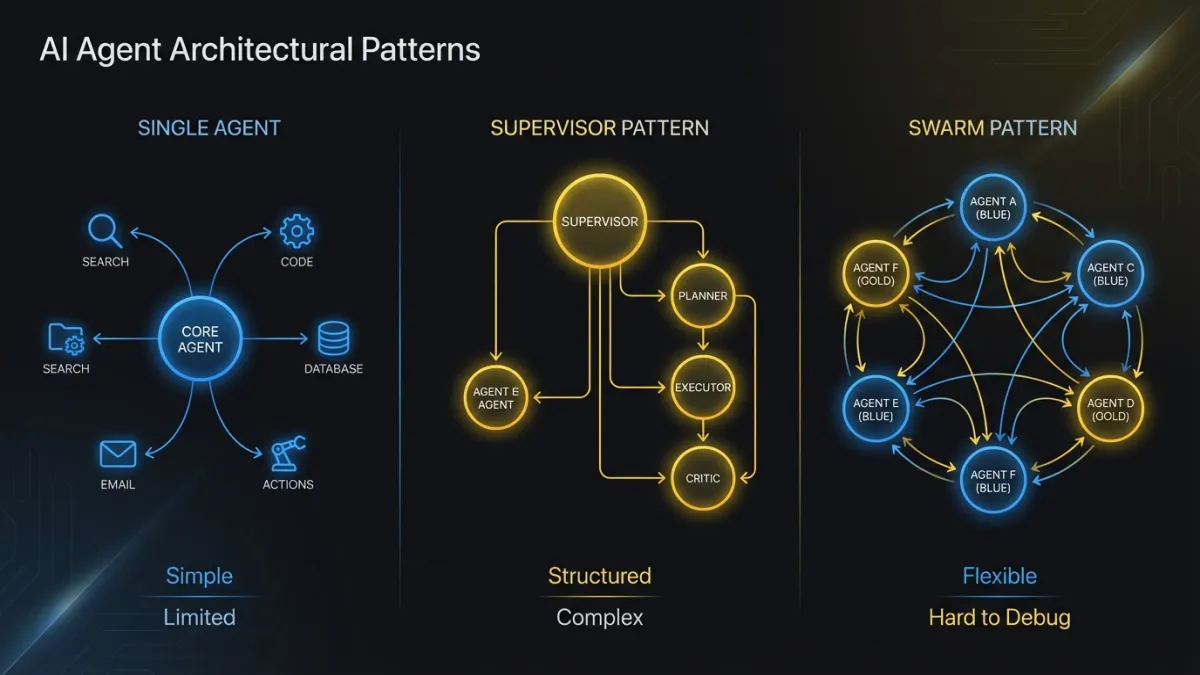
Three patterns cover most production agent deployments. The choice depends on task complexity and the number of distinct capabilities the system needs.
Single Agent with Tool Routing
One agent, one LLM backbone, multiple tools. The agent decides which tool to call at each step. This is the right pattern when the task domain is bounded and a single model can handle all the reasoning.
Most customer support agents, data retrieval agents, and internal workflow agents fit here. The agent has 10 to 30 tools, routes between them based on the user’s request, and handles the full interaction. Complexity stays manageable because one agent owns the entire execution.
The limit is context window pressure. As you add tools, each schema consumes tokens. Past 40 tools, the agent starts losing accuracy on tool selection because the context is crowded. Prompt engineering helps (grouping related tools, providing selection hints), but there’s a practical ceiling.
Multi-Agent Orchestration: Supervisor Pattern
A supervisor agent receives the request, breaks it into subtasks, and delegates each subtask to a specialist agent. The supervisor coordinates results and handles cross-agent dependencies.
This works well when the system needs deep expertise across multiple domains. An agentic AI workflow that processes insurance claims might use a document extraction agent, a policy lookup agent, a fraud detection agent, and a communication agent. Each specialist has a focused tool set and optimized prompts. The supervisor handles sequencing and conflict resolution.
The tricky part is the communication protocol between agents. Agents can share state through a common store (the blackboard pattern) or through structured message passing. The blackboard pattern is simpler but harder to debug: any agent can modify shared state at any time, and tracing which agent wrote what requires careful logging. Message passing is more explicit but adds overhead in serializing and deserializing context between agents.
Multi-Agent Orchestration: Swarm Pattern
No central supervisor. Agents coordinate through shared state and handoff protocols. Each agent knows when to pass control to another agent based on the current task.
OpenAI’s Swarm framework popularized this pattern. It works by giving each agent a handoff function that transfers execution (and context) to another agent. The conversation flows between agents organically based on what the user needs.
The swarm pattern shines in conversational interfaces where the “right” agent depends on the user’s current need, not a predetermined task decomposition. A customer calls about a billing question, gets routed to the billing agent, mentions a technical issue, gets handed off to the support agent, asks about upgrading, gets handed to the sales agent. No supervisor needed.
The downside is coordination. Without a supervisor, no single point understands the full execution state. If something goes wrong, you reconstruct the execution path from each agent’s individual logs. This pattern needs the strongest observability investment.
Human-in-the-Loop Integration
Human approval checkpoints don’t bolt onto any of these patterns cleanly. They require explicit design because they break the agent’s execution flow.
The practical implementation: when the agent reaches a decision that requires human approval (sending a customer email, executing a transaction above a threshold, modifying a production config), it writes its current state to the checkpoint store, emits an approval request to a queue, and stops. The execution enters a waiting_human state. A human reviews the proposed action, approves or rejects it. On approval, execution resumes from the checkpoint. On rejection, the agent receives the rejection reason and replans.
The hard part is timeout handling. What if the human doesn’t respond for 6 hours? The context may be stale by then. Customer data might have changed. The agent needs to know whether to resume with the original context or re-gather fresh data. There’s no universal answer. It depends on the domain. Financial transactions should re-verify. Content approvals can usually resume as-is.
What Frameworks Get Wrong
AI agent frameworks accelerate prototyping. They also create debugging nightmares at scale. The friction comes from three patterns.
Over-abstraction hides the prompt. When the framework constructs the prompt from your configuration, you lose visibility into what the LLM actually sees. A tool definition you thought was clear gets reformatted into something ambiguous. The agent misbehaves, and you can’t tell whether the problem is your prompt, the framework’s prompt construction, or the model’s interpretation. The first debugging step is always “print the actual prompt.” If your framework makes that hard, it’s costing you time.
Magic state management creates invisible coupling. Some frameworks manage agent memory and conversation state through internal stores that update implicitly. Your agent behaves differently on the fifth turn than the first, and you’re not sure what changed because state mutations happen inside framework internals. Explicit state management (you own the state object, you decide what goes in and out) is more code and more clarity.
Abstraction layers fight your infrastructure. The framework wants to manage its own HTTP clients, connection pools, retry logic, and logging. Your infrastructure already has opinions about all of these. Running both creates conflicts: duplicate logs, competing retry policies, connection pool exhaustion. The framework’s convenience features become operational liabilities.
None of this means frameworks are bad. For prototypes and internal tools, use them. For production systems that need to run reliably at scale, evaluate whether the framework is saving you time or creating a debugging tax. Many teams start with a framework and gradually replace its internals with custom implementations as they hit scaling issues. That’s a reasonable path, as long as the framework’s architecture allows piecemeal replacement.
Our team builds custom agent systems when the production requirements outgrow what frameworks provide. The decision point is usually clear: if you’re spending more time working around the framework than working with it, the abstraction has become a liability.
Evaluation: Testing Agents Before and After Deployment
Agent evaluation is harder than testing traditional software because the outputs are non-deterministic. The same input can produce different (but equally valid) outputs across runs. Pass/fail unit tests don’t capture the full picture.
Pre-deployment evaluation uses curated test suites that cover critical paths. Each test case defines an input, the expected actions (which tools should be called, in what order), and success criteria (the output should contain X, the database should reflect Y). Run the suite against every prompt change, model update, or tool modification. Track pass rates over time. A drop from 94% to 87% after a prompt edit means the edit broke something.
Post-deployment evaluation monitors live executions for quality regressions. Sample a percentage of executions, run them through automated quality checks (did the agent resolve the user’s request? did it call tools in a reasonable sequence?), and flag outliers for human review. This catches drift that pre-deployment testing misses: changes in user behavior, API response format shifts, model behavior updates.
Adversarial testing probes the agent’s boundaries. Feed it ambiguous inputs. Give it conflicting instructions. Present tool results that are technically valid but misleading. Production agents encounter all of these. Testing should too.
The evaluation harness is as important as the agent itself. Teams that treat evaluation as an afterthought spend their time firefighting in production. Teams that invest in evaluation infrastructure catch problems before users do.
The Honest Version
Building AI agents for production is a systems engineering problem, not a prompt engineering problem. The LLM is the reasoning engine. Everything around it (state management, failure handling, observability, tool design, evaluation) is what makes it production-grade.
If you’re starting an agent project, spend your first week on infrastructure, not prompts. Set up state checkpointing. Build circuit breakers for your tool calls. Instrument decision tracing from day one. Get evaluation running before you demo the agent to anyone.
The demo will work without any of this. Production won’t.
Ready to build production-grade AI agents? Our team has shipped agent systems across industries. Get in touch to talk about your architecture.