Your competitors are shipping AI features. You know this because they won’t stop talking about it on LinkedIn. Chatbots, copilots, AI assistants with friendly names. The demos look impressive. The usage numbers tell a different story.
We’ve embedded into enough SaaS product teams to see the pattern clearly. The features that get the most marketing attention rarely drive retention or expansion. The AI features customers actually value are quieter, less visible, and far more useful.
The chatbot trap
Most SaaS companies start their AI strategy with a chatbot. It makes sense on the surface. Conversational AI is familiar, easy to demo, and feels like a big feature launch.
Here’s the problem. Chatbot adoption in B2B SaaS products sits between 5% and 15% of monthly active users after the first 90 days. We’ve seen this across a dozen products. The number rarely climbs.
Users don’t want a new interface. They want the existing interface to be smarter. They don’t want to type a question and wait for an answer. They want the answer to already be there when they look.
This distinction changes what you build. A chatbot is an addition. A smart default is an improvement. Customers will always prefer the product that requires less effort over the one that offers a new way to ask for help.
Six AI feature categories that actually drive retention
These are ranked roughly by implementation complexity, starting with the features that deliver the most value relative to engineering effort.
1. Smart defaults and auto-completion
The highest-impact AI feature in most SaaS products is one users barely notice: filling in the right answer before they type it.
Stripe does this well with tax categorization. When a merchant adds a new product, Stripe suggests the tax code based on the product description and the merchant’s industry. No AI badge. No sparkle emoji. Just a pre-filled field that’s right 85% of the time.
For your product, look at every form, every configuration screen, every setup wizard. Where do users pause? Where do they copy-paste from another record? Where do they ask support what to enter? Those are your auto-completion candidates.
A project management tool that pre-fills story point estimates based on historical team velocity and ticket complexity. A CRM that suggests the next follow-up date based on deal stage patterns. An invoicing platform that auto-categorizes line items based on past entries. These features save seconds per interaction, but across thousands of interactions per month, they compound into hours.
Implementation cost: low to moderate. You need a classification model trained on your product’s historical data. Most teams can ship a first version in 2-4 weeks with a fine-tuned model or even well-structured heuristics backed by an LLM.
2. Predictive surfacing
Users shouldn’t have to go looking for the information they need. The product should bring it forward.
Consider a customer success platform that flags accounts likely to churn 30 days before renewal. The CSM doesn’t run a report or ask a chatbot. They open their dashboard and the at-risk accounts are already highlighted, with the specific signals that triggered the prediction: declining login frequency, unresolved support tickets, missed QBR.
Predictive surfacing works because it operates on the user’s existing mental model. They’re already looking at a dashboard. They’re already reviewing a list. The AI doesn’t change the workflow. It makes the existing workflow more precise.
The data requirements are real. You need at least 6-12 months of behavioral data and enough signal density to make useful predictions. But if you’ve been running a SaaS product for more than two years, you probably have what you need.
3. Automated categorization and tagging
This is the workhorse feature that nobody writes blog posts about. It’s also the one that reduces support burden, improves reporting accuracy, and makes every other feature in the product work better.
A helpdesk platform that auto-tags incoming tickets by category, urgency, and product area. A document management system that classifies uploads by type and extracts metadata. An e-commerce platform that auto-categorizes products into a taxonomy of 500+ categories.
Manual categorization is where data quality goes to die. Users skip it, do it inconsistently, or get it wrong under time pressure. AI categorization running in the background with confidence scores and human review for edge cases produces cleaner data than any amount of user training.
One product team we worked with found that auto-categorization on support tickets improved their reporting accuracy by 40%. Not because the AI was smarter than their agents. Because the AI was consistent. It categorized the 200th ticket of the day with the same attention as the first.
4. Anomaly detection and proactive alerts
Users don’t want to monitor dashboards. They want the dashboard to tap them on the shoulder when something goes wrong.
An analytics platform that detects unusual drops in a key metric and sends an alert before the user’s Monday morning check-in. A financial platform that spots duplicate invoices or unusual spending patterns. A DevOps tool that identifies deployment anomalies before they trigger customer-facing incidents.
Anomaly detection is high value because the cost of a missed anomaly is concrete and measurable. A billing error that runs for three days costs real money. A performance regression that goes unnoticed for a week costs real customers.
The technical bar here is moderate. Statistical methods (z-scores, isolation forests) handle many use cases without deep learning. The harder part is tuning alert sensitivity so users trust the system. Too many false positives and they’ll ignore it. This is where embedded AI expertise matters. Getting the threshold calibration right requires iteration with real user feedback, not a one-time model deployment.
5. Intelligent search and filtering
Search is broken in most B2B SaaS products. Users have adapted by memorizing where things live, building elaborate folder structures, or just asking colleagues on Slack. This is a failure so normalized that product teams stop seeing it.
Semantic search changes the equation. Instead of requiring exact keyword matches, the product understands intent. A user searching “that proposal we sent to the healthcare client in Q3” in a document management system should find it, even if none of those exact words appear in the filename or metadata.
The implementation path is well-established: embed your content using a model like OpenAI’s text-embedding-3 or an open-source alternative, store the vectors, and run similarity searches. The engineering is straightforward. The impact is significant. We’ve seen search usage increase 3x after switching from keyword to semantic search, because users finally trust that search will find what they need.
Pair semantic search with faceted filtering powered by the auto-categorization from point three, and you have a discovery experience that reduces time-to-information by 60-70%.
6. Workflow automation
This is the unglamorous category that drives the most revenue impact. AI that doesn’t just inform decisions but executes routine actions.
A recruiting platform that automatically schedules interviews based on interviewer availability, candidate timezone, and role urgency. A procurement tool that routes approval requests based on historical approval patterns and dollar thresholds. An HR platform that generates offer letters by pulling compensation data, role requirements, and candidate details into a template with appropriate customization.
Workflow automation requires the highest trust threshold. Users need to understand what the AI will do, review it before execution (at least initially), and have a clear override path. The products that get this right use a pattern we call “draft and confirm.” The AI prepares the action. The user approves it with one click. Over time, as confidence builds, some actions can move to full automation with audit logs.
How to prioritize: the effort-impact-data framework
You can’t build all six categories at once. Here’s how to decide what goes first.
Score each candidate feature on three dimensions:
User impact. How many users hit this friction point, and how often? A feature that saves 30 seconds for every user on every session beats one that saves 5 minutes for 10% of users monthly.
Data readiness. Do you have the training data today, or do you need to instrument and collect for 6 months first? Features where the data already exists in your database ship faster and with less risk.
Implementation complexity. Can you ship a meaningful first version in under 4 weeks, or does this require new infrastructure, model training, and a team you don’t have?
Plot your candidates on these three axes. The obvious first movers are high impact, data-ready, and low complexity. Smart defaults and auto-categorization almost always land here. Predictive features and anomaly detection typically require more data preparation. Workflow automation requires the most cross-functional effort.
Build vs. embed: the integration decision
Every AI feature presents a build-or-buy question. The answer depends on how close the feature is to your core product value.
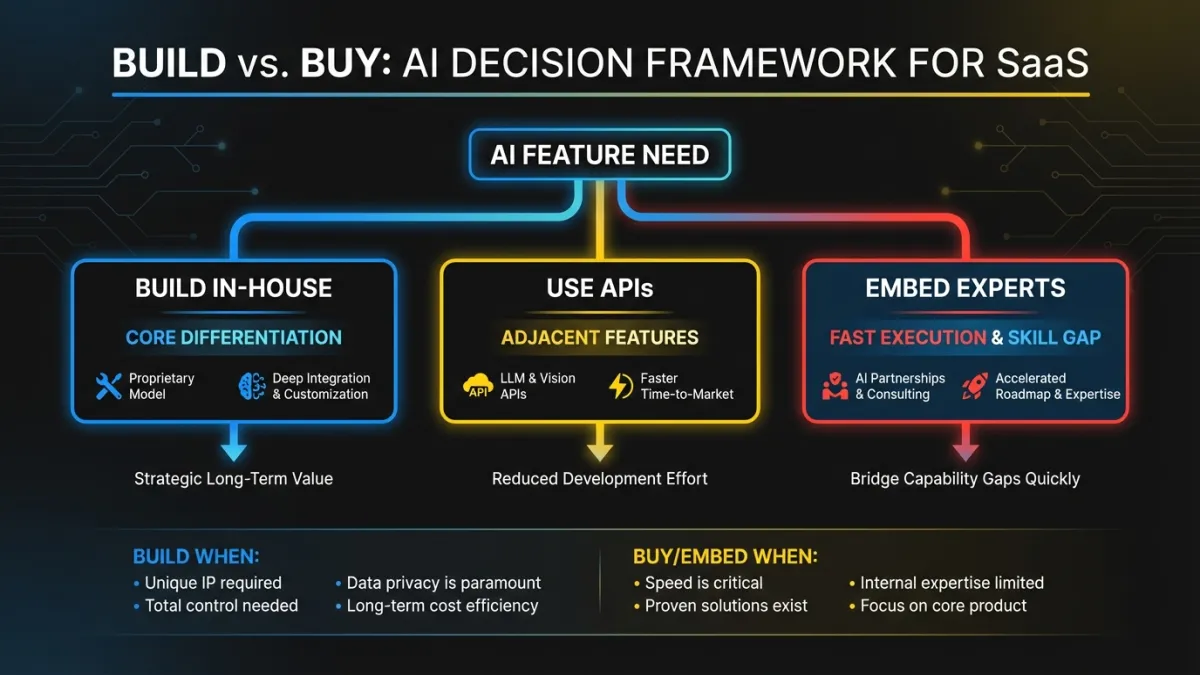
Build in-house when the AI feature is your product differentiation. If you’re a sales analytics platform and predictive deal scoring is your key value prop, you build that model yourself. You train it on your data. You own the iteration cycle. This is competitive advantage.
Use foundation model APIs when the AI feature is adjacent to your core value. Content summarization, semantic search, text generation. These capabilities are commoditized. Calling OpenAI or Anthropic’s API and wrapping it in your product context is faster and cheaper than training your own model. Your differentiation isn’t the summarization itself. It’s what you summarize, how you present it, and how it connects to the user’s workflow.
Bring in embedded AI engineers when you need to move fast but your team lacks the specific expertise. Most SaaS engineering teams are strong on web development, infrastructure, and product engineering. Few have experience with ML pipelines, embedding models, fine-tuning, and production AI systems. The gap isn’t talent. It’s specialization. Embedding a senior AI engineer into the team for 3-6 months transfers the knowledge while shipping the features.
For a deeper look at sequencing this work, see our guide on AI product strategy.
Three mistakes that sink AI feature launches
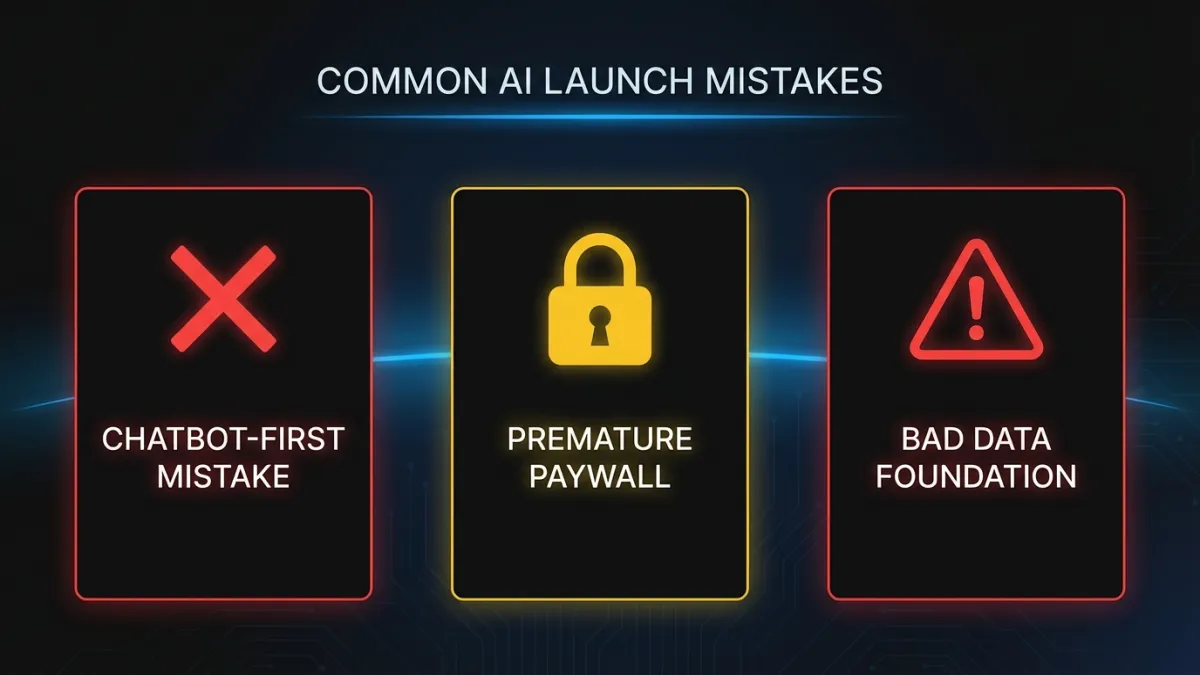
Chatbot-first thinking
We covered this above, but it bears repeating. If your first AI feature is a chatbot, you’ve optimized for demo impressions, not user value. Start with features that improve existing workflows. Ship the chatbot later, after you’ve built the AI infrastructure and earned user trust.
Paywalling AI behind a premium tier before proving value
Some SaaS companies gate every AI feature behind their highest pricing tier from day one. This limits adoption data, slows feedback loops, and tells mid-tier customers that the product will get smarter, but not for them.
A better approach: ship AI features to all tiers initially. Measure adoption and impact. Then gate the advanced capabilities (custom models, higher usage limits, priority processing) in premium tiers. Give users a reason to upgrade based on demonstrated value, not a locked icon.
Ignoring data readiness
The most common reason AI features underperform is bad input data. A recommendation engine trained on inconsistently tagged content will produce inconsistent recommendations. An anomaly detection system running on metrics with irregular collection intervals will generate false positives.
Before building the AI feature, audit the data it depends on. Fix the categorization. Standardize the collection. Backfill the gaps. This work is invisible and unglamorous. It’s also the difference between an AI feature users love and one they disable after a week.
Where to go from here
Pick one feature from the six categories above. Choose the one where you already have clean data and a clear user pain point. Build the smallest version that delivers value. Ship it without an AI badge or a sparkle icon. Measure whether users are faster, more accurate, or more engaged.
If you want help identifying the right first feature and building it into your product, our AI integration team embeds directly into your engineering team and ships within your release cycle. No handoffs. No black boxes. Just AI capability that lives inside your product where it belongs. Get in touch to start the conversation.